The Problem
Customer wants to have a CSV file hosted in Confluence, which will serve as the source of options to be displayed in a select list within Jira. This list comprises approximately 4,000 options, representing the names of products used within the company.
To accomplish this, a ScriptRunner script has been created as a scheduled job in ScriptRunner that runs daily. This job is responsible for reading a CSV file hosted in Confluence through the Application Link and adding all the options to the Assets feature in Jira Service Management.
If new lines are added to the CSV file, the script will include these new options. If only updates are made to an existing product in the CSV, the script will simply update the attributes of that object.
It is necessary to use the file’s download URL without specifying the version parameter. This way, the script will always fetch the latest version of the CSV file.
For example:
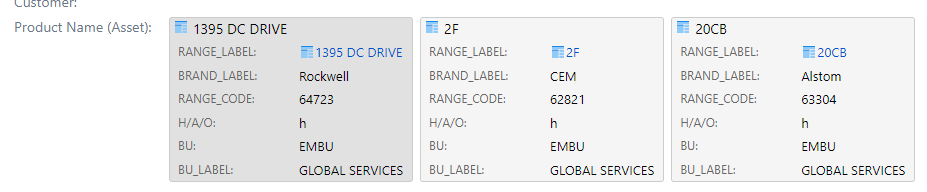
Once the synchronization is completed, the objects will be displayed in Assets and available for use within the solution.
📌 This solution requires: Jira Service Management (Data Center), Script Runner and Confluence.
Necessary Configuration
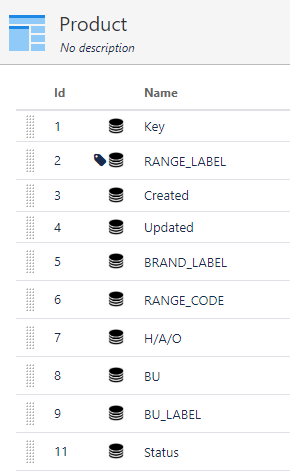
- You will need to create the object in the Assets table called Product. In my case, I will be creating other attributes within this object such as BRAND_LABEL, RANGE_CODE, RANGE_LABEL, H/A/O, BU, and BU_LABEL. All of these attributes are present within the CSV file, and the script will read and store them in the Assets table
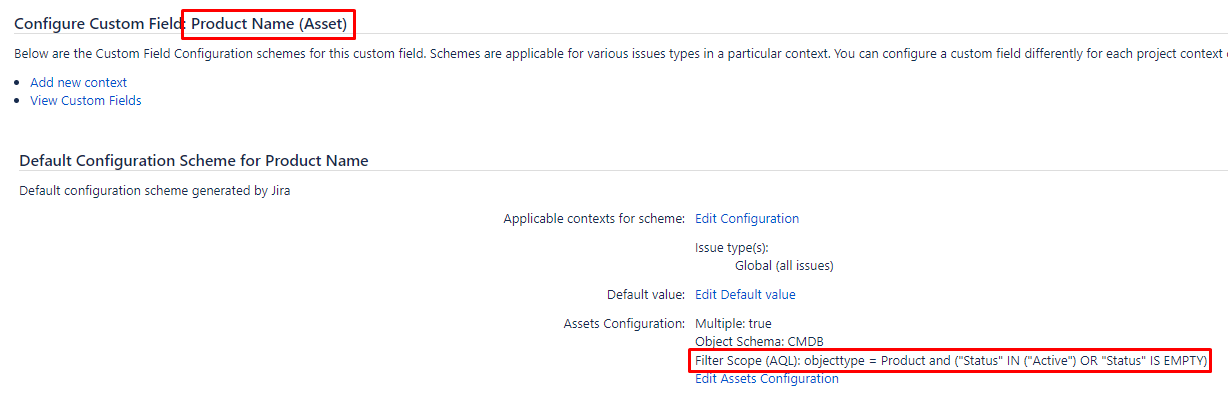
- You will also need to create a custom field of the Assets type, in which the configuration will list all Products with the IQL: objecttype = Product and (“Status” IN (“Active”) OR “Status” IS EMPTY). This field will list all the products stores in the Assets tables.
The Code
import com.atlassian.applinks.api.ApplicationLink
import com.atlassian.applinks.api.ApplicationLinkService
import com.atlassian.applinks.api.application.confluence.ConfluenceApplicationType
import com.atlassian.jira.component.ComponentAccessor
import com.atlassian.sal.api.component.ComponentLocator
import com.atlassian.sal.api.net.Request
import com.atlassian.sal.api.net.Response
import com.atlassian.sal.api.net.ResponseException
import com.atlassian.sal.api.net.ResponseHandler

//Set the ID of the Confluence page
final def confluencePageID = 'http://localhost:8090/confluence/download/attachments/98371/selectlists.csv?modificationDate=1677245034177&api=v2'


static ApplicationLink getPrimaryConfluenceLink() {
    final def applicationLinkService = ComponentLocator.getComponent(ApplicationLinkService)
    final def confLink = applicationLinkService.getPrimaryApplicationLink(ConfluenceApplicationType)
    confLink
}

def issueManager = ComponentAccessor.issueManager
def loggedInUser = ComponentAccessor.jiraAuthenticationContext.loggedInUser

def authenticatedRequestFactory = primaryConfluenceLink.createImpersonatingAuthenticatedRequestFactory()

def writer = new StringBuilder()
def result = new StringBuilder()

def responseHandler_GET = new ResponseHandler<Response>()  {
    @Override
    void handle(Response response) throws ResponseException {
        if (response.statusCode == HttpURLConnection.HTTP_OK) {
            result.append(response.responseBodyAsString)
        } else {
            throw new Exception(response.responseBodyAsString)
        }
    }
}

authenticatedRequestFactory .createRequest(Request.MethodType.GET, "${confluencePageID}") .addHeader('Content-Type', 'text/csv') .execute(responseHandler_GET)

def csvLines = result.toString().readLines()
for (def csvline : csvLines) {

    def columns = csvline.split(';')

    try{

        if (Assets.search("objectType = Product and RANGE_LABEL = \""+ columns[2] +"\"").size() == 0) {
            if (columns[2] != ""){
                Assets.create('CMDB', 'Product') {
                    setAttribute('BRAND_LABEL', columns[0])
                    setAttribute('RANGE_CODE', columns[1])
                    setAttribute('RANGE_LABEL', columns[2])
                    setAttribute('H/A/O', columns[3])
                    setAttribute('BU', columns[4])
                    setAttribute('BU_LABEL', columns[5])
                }
            }
        } else {
            Assets.search("objectType = Product and RANGE_LABEL = \""+ columns[2] +"\"").each {
                log.debug(it.getName())
                it.update {
                    setAttribute('BRAND_LABEL', columns[0])
                    setAttribute('RANGE_CODE', columns[1])
                    setAttribute('H/A/O', columns[3])
                    setAttribute('BU', columns[4])
                    setAttribute('BU_LABEL', columns[5])
                }
            }
        }
    } catch(Exception e){
        log.error("Error in line" + csvline)
    }
}
To be easier I wrote the script using HAPI from ScriptRunner.
Final result

 Atlassian Expert Tips