
Introduction
Migrating data between instances is a common challenge in the realm of software applications, and it becomes even more complex when dealing with substantial amounts of attachments. In a recent migration project, I faced a unique challenge – a client with a staggering 400GB of attachments, solely within the Zephyr Scale app. This marked the largest migration recorded according to the app support team.
The Challenge
Handling such a massive volume of attachments posed a significant challenge in terms of transfer speed and overall efficiency. Only using JCMA without any data processing was proving to be time-consuming (close to 5 days) prompting me to explore innovative solutions to optimize the migration process.
The Solution
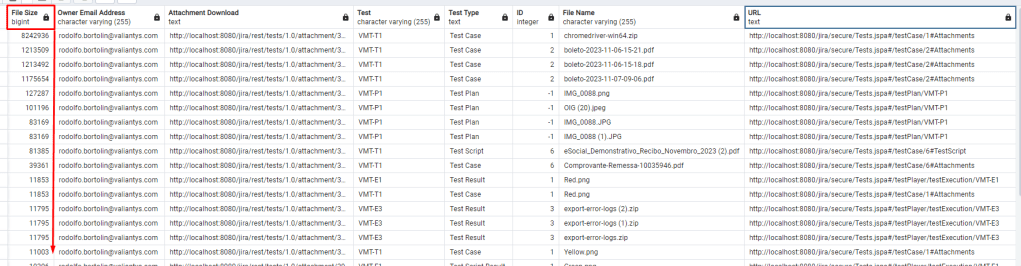
To address the attachment transfer bottleneck, I created a strategy to identify and handle the largest attachments within the Zephyr Scale instance. The key to achieving this was the creation of a query that would aggregate attachments from various parts of the app into a single result set.
Postgres Query:
SELECT *
FROM (
    SELECT att."FILE_SIZE" "File Size",
           cwd."email_address" "Owner Email Address",
           CONCAT('http://localhost:8080/jira/rest/tests/1.0/attachment/', att."ID") "Attachment Download",
           cases."KEY" "Test",
           'Test Case' AS "Test Type",
		   cases."TEST_SCRIPT_ID" as "ID",
	       att."NAME" "File Name",
           CONCAT('http://localhost:8080/jira/secure/Tests.jspa#/testCase/', cases."TEST_SCRIPT_ID",'#Attachments') "URL"
    FROM "AO_4D28DD_ATTACHMENT" att
    JOIN "app_user" appu ON appu.user_key = att."USER_KEY"
    JOIN "cwd_user" cwd ON cwd.lower_user_name = appu."lower_user_name"
    JOIN "AO_4D28DD_TEST_CASE" cases ON cases."ID" = att."TEST_CASE_ID"
    UNION
    SELECT att."FILE_SIZE" "File Size",
           cwd."email_address" "Owner Email Address",
           CONCAT('http://localhost:8080/jira/rest/tests/1.0/attachment/', att."ID") "Attachment Download",
           tset."KEY" "Test",
           'Test Plan' AS "Test Type",
	       -1 AS "ID",
	       att."NAME" "File Name",
           CONCAT('http://localhost:8080/jira/secure/Tests.jspa#/testPlan/', tset."KEY") "URL"
    FROM "AO_4D28DD_ATTACHMENT" att
    JOIN "app_user" appu ON appu.user_key = att."USER_KEY"
    JOIN "cwd_user" cwd ON cwd.lower_user_name = appu."lower_user_name"
    JOIN "AO_4D28DD_TEST_SET" tset ON tset."ID" = att."TEST_SET_ID"
    UNION
    SELECT att."FILE_SIZE" "File Size",
           cwd."email_address" "Owner Email Address",
           CONCAT('http://localhost:8080/jira/rest/tests/1.0/attachment/', att."ID") "Attachment Download",
           run."KEY" "Test Cycle",
           'Test Run' AS "Test Type",
		   -1 as "ID",
	       att."NAME" "File Name",
           CONCAT('http://localhost:8080/jira/secure/Tests.jspa#/testCycle/', run."KEY",'#Attachments') "URL"
    FROM "AO_4D28DD_ATTACHMENT" att
    JOIN "app_user" appu ON appu.user_key = att."USER_KEY"
    JOIN "cwd_user" cwd ON cwd.lower_user_name = appu."lower_user_name"
    JOIN "AO_4D28DD_TEST_RUN" run ON run."ID" = att."TEST_RUN_ID"
	UNION
	SELECT att."FILE_SIZE" "File Size",
           cwd."email_address" "Owner Email Address",
           CONCAT('http://localhost:8080/jira/rest/tests/1.0/attachment/', att."ID") "Attachment Download",
           rst."KEY" "Test",
           'Test Script Result' AS "Test Type",
	       att."TEST_SCRIPT_RESULT_ID" as "ID",
	       att."NAME" "File Name",
           CONCAT('http://localhost:8080/jira/secure/Tests.jspa#/testPlayer/testExecution/', rst."KEY") "URL"
    FROM "AO_4D28DD_ATTACHMENT" att
    JOIN "app_user" appu ON appu.user_key = att."USER_KEY"
    JOIN "cwd_user" cwd ON cwd.lower_user_name = appu."lower_user_name"
	JOIN "AO_4D28DD_TEST_RESULT" rst on att."TEST_SCRIPT_RESULT_ID" = rst."ID"
	UNION
	SELECT att."FILE_SIZE" "File Size",
           cwd."email_address" "Owner Email Address",
           CONCAT('http://localhost:8080/jira/rest/tests/1.0/attachment/', att."ID") "Attachment Download",
           cases."KEY" "Test",
           'Test Script' AS "Test Type",
		   cases."TEST_SCRIPT_ID" AS "ID",
	       att."NAME" "File Name",
           CONCAT('http://localhost:8080/jira/secure/Tests.jspa#/testCase/', cases."TEST_SCRIPT_ID", '#TestScript') "URL"
    FROM "AO_4D28DD_ATTACHMENT" att
    JOIN "app_user" appu ON appu.user_key = att."USER_KEY"
    JOIN "cwd_user" cwd ON cwd.lower_user_name = appu."lower_user_name"
    JOIN "AO_4D28DD_TEST_CASE" cases ON cases."ID" = att."STEP_ID"
	JOIN "AO_4D28DD_STEP_ENTITY" steps on steps."ID" = cases."TEST_SCRIPT_ID"
	UNION
	SELECT att."FILE_SIZE" "File Size",
           cwd."email_address" "Owner Email Address",
           CONCAT('http://localhost:8080/jira/rest/tests/1.0/attachment/', att."ID") "Attachment Download",
           cases."KEY" "Test",
           'Test Result' AS "Test Type",
	       att."TEST_RESULT_ID" AS "ID",
	       att."NAME" "File Name",
           CONCAT('http://localhost:8080/jira/secure/Tests.jspa#/testPlayer/testExecution/', cases."KEY") "URL"
    FROM "AO_4D28DD_ATTACHMENT" att
    JOIN "app_user" appu ON appu.user_key = att."USER_KEY"
    JOIN "cwd_user" cwd ON cwd.lower_user_name = appu."lower_user_name"
    JOIN "AO_4D28DD_TEST_RESULT" cases ON cases."ID" = att."TEST_RESULT_ID"
) AS "innertable"
ORDER BY 1 DESC
LIMIT 1000;
This query, while extensive, allowed me to pinpoint the largest attachments across the entire Zephyr Scale efficiently.
Of course, in these examples, I am working with my local instance, so the attachments and filenames are from my local machine to preserve the identity of our client.
Implementation
Following the query execution, I developed a Python script to automate the next process. This script reads the exported CSV generated by the query and, for each attachment, uploads it to an Amazon S3 bucket. Simultaneously, the script creates a simple text file containing the URL for users to access the original file. The massive attachment is then replaced by this concise text file, ensuring that end-users can seamlessly retrieve their original files.
The Python Script
import boto3
import csv
import os
import requests
from requests.auth import HTTPBasicAuth
from io import BytesIO
# AWS S3 credentials and bucket information
AWS_ACCESS_KEY = '*************'
AWS_SECRET_KEY = '*************'
AWS_REGION = 'us-east-2'
S3_BUCKET_NAME = 'S3_BUCKET_NAME'
S3_BUCKET = 'https://S3_BUCKET_NAME.s3.us-east-2.amazonaws.com'
# Jira API Information
JIRA_BASE_URL = 'http://localhost:8080/jira'
auth = HTTPBasicAuth("admin", "admin")
headers = {}
# https://support.smartbear.com/zephyr-scale-server/api-docs/v1/
def get_jira_attachment_url(test_type, test_key, id):
    if "Test Case" in test_type:
        return f"{JIRA_BASE_URL}/rest/atm/1.0/testcase/{id}/attachments"
    elif "Test Result" in test_type:
        return f"{JIRA_BASE_URL}/rest/atm/1.0/testresult/{id}/attachments"
    elif "Test Plan" in test_type:
        return f"{JIRA_BASE_URL}/rest/atm/1.0/testplan/{test_key}/attachments"
    elif "Test Script Result" in test_type:
        return f"{JIRA_BASE_URL}/rest/tests/1.0/testscriptresult/{id}/attachment"
    elif "Test Script" in test_type:
        return f"{JIRA_BASE_URL}/rest/atm/1.0/testcase/{test_key}/step/{id}/attachments"
    else:
        return None
def upload_to_s3(file_name, file_size, owner_email, attachment_download, key, test_type, id, url):
    s3 = boto3.client(
        's3',
        aws_access_key_id=AWS_ACCESS_KEY,
        aws_secret_access_key=AWS_SECRET_KEY,
        region_name=AWS_REGION
    )
    try:
        response = requests.get(attachment_download, headers=headers, auth=auth)
        response.raise_for_status()
        folder_key = f"{test_type}/{key}/{id}/" if "Test Case" in test_type or "Test Result" in test_type else f"{test_type}/{key}/"
        s3_key = f"{folder_key}{file_name}"
        s3.put_object(Bucket=S3_BUCKET_NAME, Key=folder_key, Body='')
        s3.upload_fileobj(BytesIO(response.content), S3_BUCKET_NAME, s3_key)
        print(f"Uploaded {file_name} to S3 bucket {S3_BUCKET_NAME} with key {s3_key}")
        return s3_key
    except requests.exceptions.RequestException as e:
        print(f"Error downloading/uploading attachment for {file_name}: {str(e)}")
def delete_attachment(attachment_url):
    try:
        response = requests.delete(attachment_url, headers=headers, auth=auth)
        response.raise_for_status()
        print(f"Deleted attachment at {attachment_url}")
    except requests.exceptions.RequestException as e:
        print(f"Error deleting attachment at {attachment_url}: {str(e)}")
def update_attachment_in_jira(test_type, test_key, file_name, id, s3_key):
    jira_attachment_url = get_jira_attachment_url(test_type, test_key, id)
    if jira_attachment_url is None:
        print("Invalid test_type")
        return

    # Specify the 'attachments' folder for storing files
    attachments_folder = 'attachments'
    current_directory = os.path.join(os.getcwd(), attachments_folder)
    # Ensure the 'attachments' folder exists, create it if not
    if not os.path.exists(attachments_folder):
        os.makedirs(attachments_folder)
    current_directory = os.getcwd()
    file_path = os.path.join(current_directory, f"{file_name}.txt")
    try:
        with open(file_path, 'w') as f:
            url = f"{S3_BUCKET}/{s3_key.replace(' ', '+')}"
            f.write(url)
        files = {'file': open(f'{file_name}.txt', 'rb')}
        response = requests.post(jira_attachment_url, files=files, auth=auth)
        if response.status_code == 201 or response.status_code == 200:
            print(f"Updated attachment in Jira at {jira_attachment_url} for {test_type} {test_key}")
        else:
            print(f"Error uploading text file {file_name}.txt to Jira: {response.status_code}")
    except FileNotFoundError as e:
        print(f"Error uploading text file {file_name}.txt to Jira: {str(e)}")
def process_csv_file(csv_file_path):
    with open(csv_file_path, 'r') as csv_file:
        csv_reader = csv.DictReader(csv_file, delimiter=';')
        for row in csv_reader:
            s3_key = upload_to_s3(row['File Name'], row['File Size'], row['Owner Email Address'], row['Attachment Download'], row['Test'], row['Test Type'], row['ID'], row['URL'])
            if s3_key:
                update_attachment_in_jira(row['Test Type'], row['Test'], row['File Name'], row['ID'], s3_key)
                delete_attachment(row['Attachment Download'])
# Replace 'zephyr_data.csv' with the actual path to your CSV file
csv_file_path = 'zephyr_data.csv'
# Process the CSV file and upload attachments to S3 and update in Jira
process_csv_file(csv_file_path)
Results and Benefits
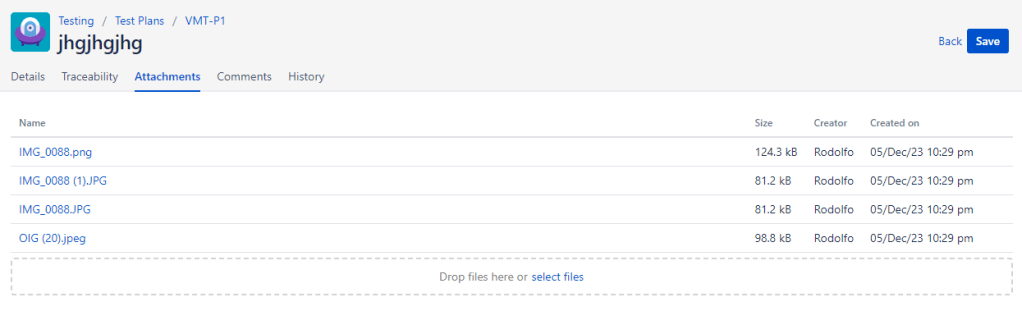
Within the app, in the next two images you will see the difference to the user. Instead of having large files available to the user, they will find text files that contain the address of the original file stored within AWS.
It went from this:
To this:
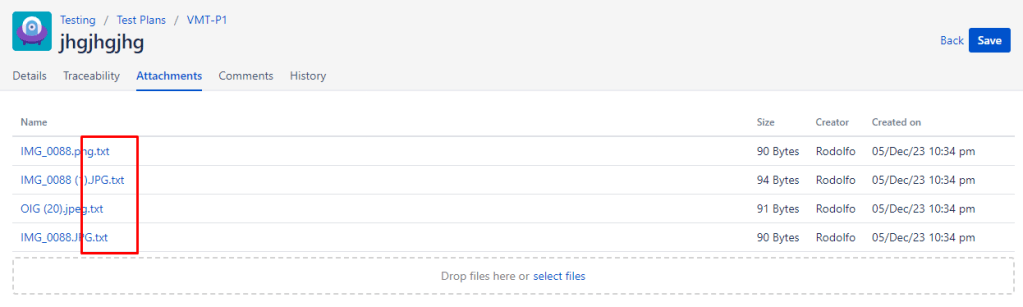
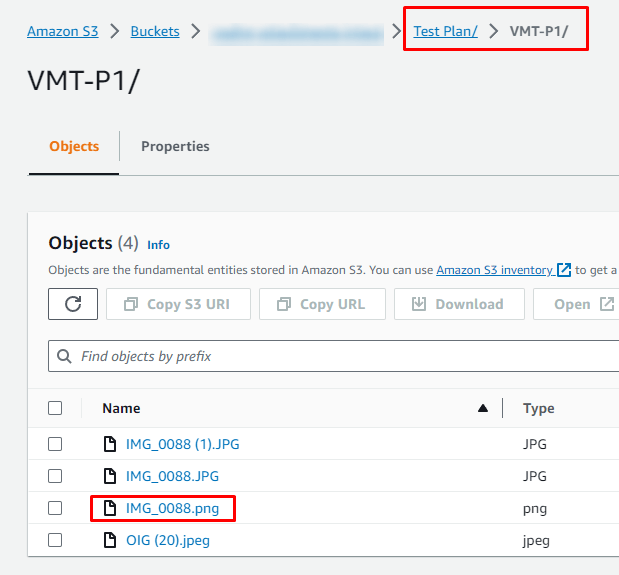
Here is an image of the attachment IMG_0088.png which was replaced by IMG_0088.png.txt with the URL pointing to the location of the S3 bucket where the original file is stored.

Here is an image of the S3 bucket structure where the Test Plans, Test Plans, among others:
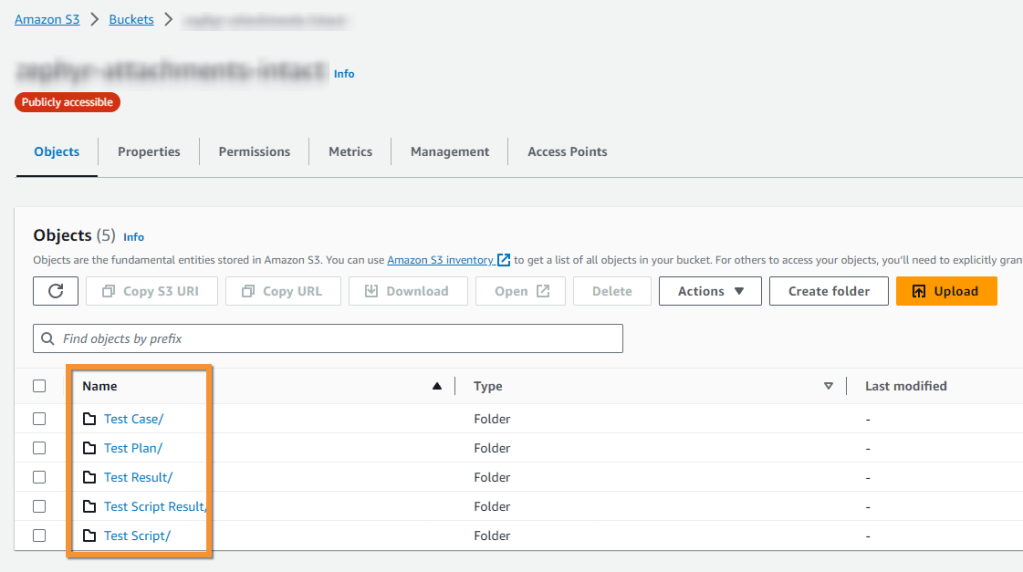
I organized the folders separately using the access key, making it easier to find what is needed.
The analysis of the Zephyr Scale instance revealed numerous files exceeding several gigabytes. By implementing this solution, the migration time can be significantly reduced, alleviating potential disruptions for end-users. The process ensured a smooth transition, with users experiencing minimal impact as their files were effectively redirected without any loss of data.
Conclusion
In the face of one of the largest Zephyr Scale migrations on record, an innovative approach to handling substantial attachments proved to be a game-changer. The combination of a robust query and an efficient Python script streamlines the migration process. As the demand for data migrations continues to grow, embracing such optimization strategies becomes imperative for completing the migration within a short and acceptable time frame.
 Atlassian Expert Tips