
Introduction
Jira offers powerful features to help teams stay organized and efficient. Central to Jira’s capabilities is its ability to search and retrieve issues quickly. But have you ever wondered what makes Jira so efficient in delivering the right results when you search for an issue? The answer lies in a technology known as Lucene. In this blog post, we’ll demystify Lucene’s role as your Jira’s search superpower.
Understanding Lucene

At its core, Lucene is an open-source search engine library that provides the foundation for Jira’s search and indexing functionalities. It is like the magician behind the scenes, making your searches within Jira seem effortless and fast.
Document Ingestion: When you create or update an issue in Jira, you’re essentially creating a piece of information that needs to be processed by Lucene. This information is organized into a structured document.
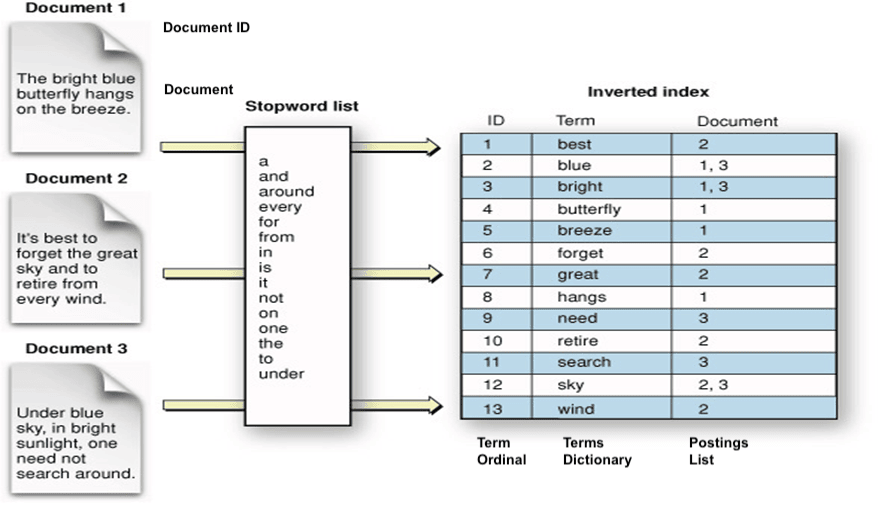
Indexing: Lucene takes this document and breaks it down into its individual parts, like words and phrases, which are then stored in a specialized data structure called an “index.” Think of this index as a catalog of all the words and phrases used in your Jira issues.
Tokenization and Analysis: As part of indexing, Lucene performs tokenization and analysis. Tokenization means splitting text into individual words or tokens. The analysis involves things like stemming (reducing words to their root form) and removing stop words (common words like “and” or “in”), which can improve search quality.
Inverted Index: Lucene creates an inverted index that maps terms (tokens) back to the documents in which they appear. This makes it possible to quickly find documents that match a specific search.
The Magic of Searching
Search: When you type in a search query in Jira, Lucene comes to life. It looks up the index to find matching documents. It uses various algorithms to determine how relevant each document is to your query.
Query Parsing: Lucene also parses your query, which can include advanced features like Boolean operators (AND, OR, NOT), wildcards, and phrase searches. The parsed query helps identify relevant documents.
Retrieval: Finally, the top-ranked documents are retrieved and presented to you as search results. In the case of Jira, these documents are issues that match your search criteria.
Why Using Custom Field Contexts is Important
When a custom field is created without a specific context, Jira might need to index and search through a vast number of issues to find relevant data for that field. This can lead to longer search times and increased resource utilization.
From a few versions, to encourage users to use more this contextual feature, Jira prompts users to narrow down the context of custom fields while they’re creating the custom field.
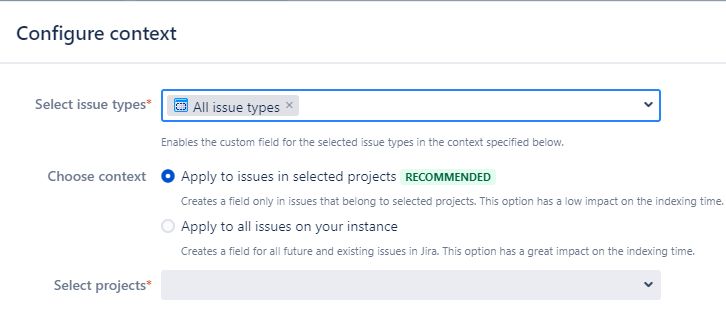
By defining a more specific context, you’re essentially telling Jira where the custom field is relevant. This helps in several ways:
- Reduced Index Size: A narrower context means that the index only needs to include data relevant to a subset of issues, reducing its overall size. A smaller index is faster to search through.
- Faster Searches: With a smaller index, searches become more efficient. Users experience quicker response times when searching for or filtering issues.
- Optimized Resource Usage: By reducing the amount of data that needs to be indexed and searched, Jira can allocate its resources more efficiently. This can lead to better overall system performance, especially in on-premises installations where resource limitations may exist.
Another way to reduce the size of the index is through archiving issues (only on Data Center) and projects.
What Information Jira Stores in the Index
Here is basically what Jira has in the index:
- issues
- comments
- worklogs
- changes in issues (change history)
Please take note that in this particular context, there are no components such as boards, filters, or dashboards. The focus strictly revolves around issues. Therefore, if you have ever pondered upon the necessity of reindexing after making changes in Jira, the general rule is that if the changes do not pertain to search (JQL) functionality, reindexing is not required.
Reindex Options
There are two options available to recreate the index in Jira, each with its own unique characteristics:

| Full re-index | Background re-index |
|---|---|
| Multi-threaded, faster to complete | Single-threaded, slower to complete (especially in large enterprise instances) |
| Can’t be canceled once started | Can be canceled at any time |
| Rebuilds the index, optimizes it, and deletes the old one | Keeps current index and updates it in place |
| Eliminates disk fragmentation | Causes disk fragmentation |
| Doesn’t affect the local node performance | Affects the local node performance |
| Ensures consistency and re-indexes issues, comments, worklogs, and the history | Doesn’t guarantee consistency, since it only re-indexes issues, but not comments, worklogs, and the history |
Use Full reindex when the indexes are damaged, which could be due to a system or disk failure. The full re-index removes all indexes and rebuilds them. It offers more advantages overall. The only drawback is that it will lock a single-node instance, making it unavailable to users during the re-indexing process.
When reindex is required
Based on the documentation provided by Atlassian, here are the recommended actions to perform a reindex of the instance:
- Custom field configurations
- Add a custom field
- Change a custom field searcher
- Edit a custom field configuration (for example, select applicable issue types or projects)
- Delete a custom field option
- Field configuration schemes
- Edit a field configuration scheme that is associated with a project*
- Associate a field configuration scheme with a project
- Time tracking configurations
- Enable time tracking
- Change time tracking settings
- App configurations (if the app introduces custom fields)
- Install an app
- Enable an app
- Change an app’s settings
Source: Reindexing in Jira after configuring an instance
Of course, it is not necessary to reindex Jira for every single action like these. However, on occasion, it is beneficial to perform a Jira reindex. Here’s why:
- As your Jira instance grows and accumulates data, it’s not uncommon to experience a decrease in indexing efficiency. This can potentially impact the performance of your Jira instance, causing slower searches and overall degradation of the system.
- Regularly reindexing your Jira instance is an effective approach to optimize performance, refresh the index, and ensure that Jira continues to deliver its best performance. By reindexing, you are refreshing the index by rebuilding it from the ground up, which helps to resolve any underlying indexing-related issues and enhances the overall speed and efficiency of search operations.
- Reindexing also aids in maintaining data integrity, as it allows Jira to extract the most up-to-date information from your instance, ensuring that search results are accurate and relevant. This is particularly beneficial in scenarios where there have been recent updates or modifications to your Jira instance.
- In addition to optimizing performance and refreshing the index, regular reindexing can also help to identify and rectify potential inconsistencies or errors within your Jira instance. It provides an opportunity to uncover any hidden issues that may have been affecting the overall system stability or data integrity.
Conclusion
In the world of software development, it’s often fascinating to discover that the tools and technologies we rely on are not always in-house creations.
As Jira continues to grow, serving both small teams and large enterprises, one can’t help but wonder about the future. Will Atlassian, in its quest for innovation and optimization, someday choose to replace Lucene with a more advanced or faster search technology? With Atlassian’s expansion into the enterprise realm, managing increasingly intricate and sizable instances of Jira, the need for more cutting-edge search capabilities becomes a possibility. Time will tell whether such a transition is in store.
Regardless of what the future holds, the reliance on open-source technologies like Lucene in prominent enterprise solutions like Jira showcases the interplay of innovation and collaboration in the software landscape. Jira’s effectiveness and efficiency remain crucial, and it will be fascinating to observe how Atlassian’s journey in the enterprise space might shape the tools and technologies we’ll be using in the years to come.
 Atlassian Expert Tips