Having to fill out templates or documentation can be a time-consuming task, especially when dealing with repetitive tasks and large datasets. A client requested a solution to export some templates in DOCX and JSON formats with Jira fields. To streamline this process, I’ve developed a solution that combines the power of Python scripting and Atlassian plugins to automate the generation of Jira issue documents in these two formats.
Overview
The solution consists of a Python script and an Atlassian plugin using Atlassian SDK that extends Jira’s functionality. The Python script interacts with the Jira REST API to retrieve issue data and create the DOCX file, while the Atlassian plugin is responsible for providing buttons within the issue to download this DOCX file generated by Python, as well as creating the JSON file and a plugin configuration interface.
Key features of the plugin:
- Adds “Download JSON” and “Download DOCX” buttons to the Jira issue view.
- Provides an administration interface for configuring Python script-related and some DOCX settings.
- Supports project-specific visibility of download buttons based on the configured project key.
Configuration
Atlassian Plugin Configuration
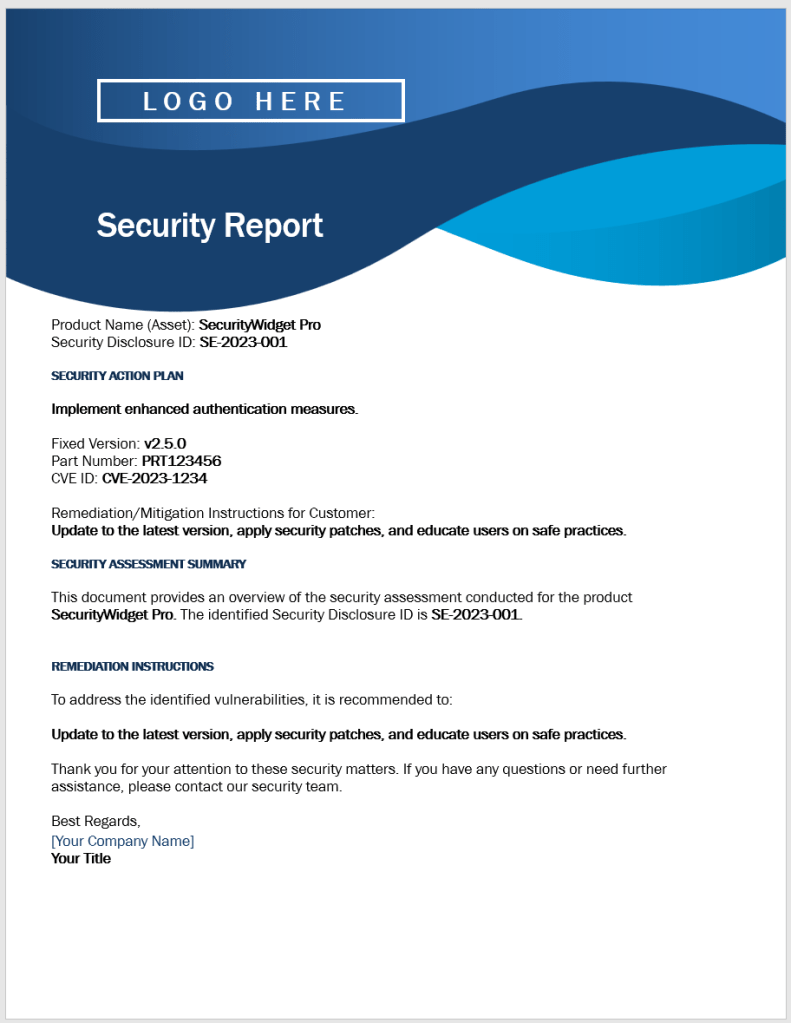
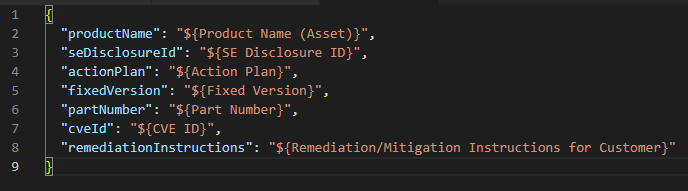
It all starts with the plugin configuration. While the JSON creation code is entirely within the plugin, generating the DOCX file has become easier using Python. For this, I used the same principle for both solutions, which is basically to replace variables marked as ${customfield_name} inside the JSON and DOCX files. Therefore, a Jira field called “Action Plan” would have to be referenced in these documents as “${Action Plan}”.
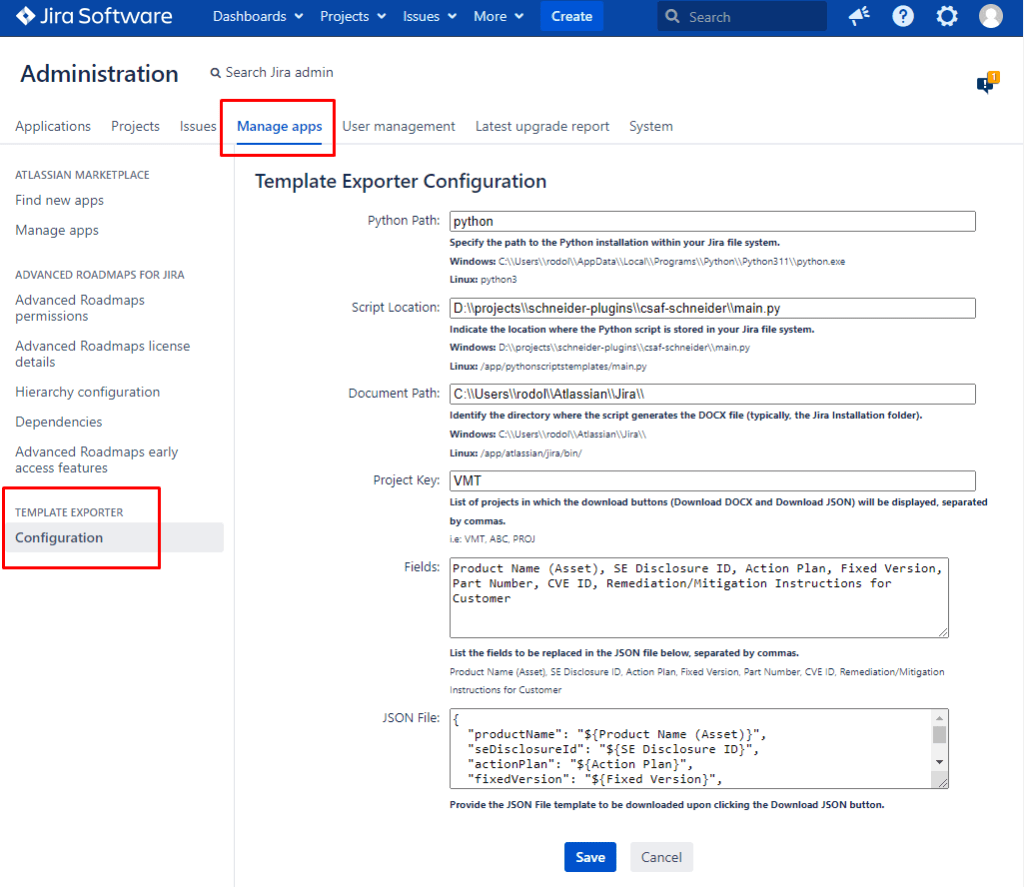
The Atlassian plugin’s configuration interface allows administrators to set:
Python Path: As the DOCX file was generated by Python, I had to install it within the Jira Data Center server, and within this variable, I store how I execute any Python script within the system, in this case on my localhost, simply by calling “python”.
Script Location: To execute the Python script, I also need to provide the location where this script is stored, so that I can call a function from Java to execute this process. For example python main.py ISSUE_KEY
Document Path: This path is used to inform Java where the file generated by Python has been stored, so that it can retrieve this file and make it available for download to the user.
Project Key: The “Download JSON” and “Download DOCX” buttons will only be available for the list of projects that I specify here. As these download buttons are specific to a system vulnerability project, I do not want to make these buttons available for all projects, but at the same time, we need flexibility in specifying which projects will or will not have these buttons.
Fields to replace: Here I inform a list of fields separated by commas that will be replaced within the JSON file. Note that the DOCX configuration does not reside here, it is within the Python script configuration, explained further ahead.
JSON File template: Here I paste the JSON structure with the tags that I want to download within the issue.
Python Script Configuration
The Python script, main.py, leverages the requests library to communicate with the Jira REST API. It fetches issue details, extracts relevant information, and replaces placeholders in a Word document template (template.docx) with the obtained data. The script supports dynamic mapping of Jira fields ${custom_field_name}, making it adaptable to various project configurations.

I used this solution because no library seemed simple or sufficient to 1) maintain the original format of the DOCX file and 2) find these variables in a simple and effective way. The Python module “docx” worked perfectly for this purpose.
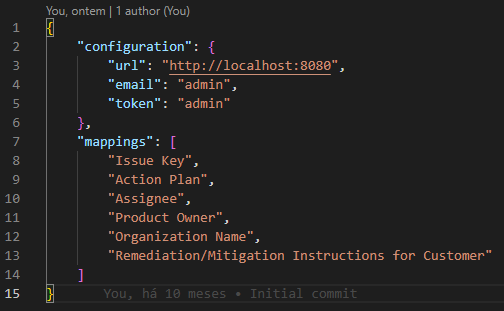
The Python script’s configuration is stored in configuration.json and includes:
- Jira instance URL: To fetch the fields using REST API.
- User email and API token for authentication.
- Field mappings for dynamic replacement
Usage
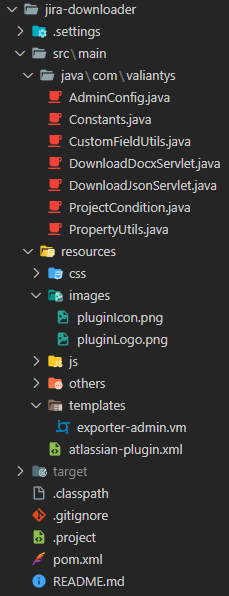
- Install the plugin through the Manage Apps interface
- Access the plugin administration interface.
- Configure the variables explained earlier.
- Insert the Python script within the Jira server.
- Configure the
configuration.jsonfile as explained earlier. - Utilize the “Download JSON” and “Download DOCX” buttons on the issue view screen.
The buttons will look like this:

The template.docx file:

The downloaded JSON file from the “Download DOCX” button in the issue:
The JSON pasted on the administration:
The downloaded JSON file from the “Download JSON” button in the issue:

Benefits
- Time Efficiency: Automates the document generation process, saving time for users.
- Consistency: Ensures consistency in document formatting and content.
- Customization: Adaptable to different Jira configurations through dynamic field mapping.
- User-Friendly: Integrates seamlessly with Jira’s interface for a user-friendly experience.
The Atlassian-Plugin.xml
<?xml version="1.0" encoding="UTF-8"?>
<atlassian-plugin key="com.valiantys" name="Jira Downloader" plugins-version="2">
	<plugin-info>
		<version>1.0</version>
		<description>A Jira plugin that adds buttons to the screen for downloading the issue in different formats.
		</description>
		<vendor name="Valiantys" url="http://www.valiantys.com/" />
		<param name="plugin-icon">images/pluginLogo.png</param>
		<param name="plugin-logo">images/pluginLogo.png</param>
	</plugin-info>

	<component-import key="applicationProperties" interface="com.atlassian.sal.api.ApplicationProperties" />

	<servlet name="json-download" key="json-downloader" class="com.valiantys.DownloadJsonServlet">
		<description key="jira-json-download-servlet.description">The Jira Json Download Servlet Plugin
		</description>
		<url-pattern>/jsondownload</url-pattern>
	</servlet>

	<web-item key="jiraJsonIssueViewerLink" name="Security Notification" section="operations-attachments" weight="10">
		<description>Download JSON</description>
		<label key="Download JSON" />
		<link>/plugins/servlet/jsondownload?issue=$issue.key</link>
		<condition class="com.valiantys.ProjectCondition"></condition>
	</web-item>

	<servlet name="docx-download" key="docx-downloader" class="com.valiantys.DownloadDocxServlet">
		<description key="jira-docx-download-servlet.description">The Jira Docx Download Servlet Plugin
		</description>
		<url-pattern>/docxdownload</url-pattern>
	</servlet>

	<web-item key="jiradocxIssueViewerLink" name="Security Notification" section="operations-attachments" weight="10">
		<description>Download DOCX</description>
		<label key="Download DOCX" />
		<link>/plugins/servlet/docxdownload?issue=$issue.key</link>
		<condition class="com.valiantys.ProjectCondition"></condition>
	</web-item>

	<web-section key="valiantys-xporter" location="admin_plugins_menu" name="Menu Web Section" weight="900">
		<description>Manage the templates that can be used to export issues.</description>
		<label key="Template Exporter"/>
	</web-section>

	<web-item key="valiantys-exporter-manage-general" name="Menu Web Item" section="admin_plugins_menu/valiantys-xporter" weight="10">
		<description>Manage Settings</description>
		<label key="Configuration"/>
		<link linkId="manage_general">/secure/admin/ValiantysExporter.jspa</link>
	</web-item>

	<webwork1 key="admin-plugin-exporter" name="ValiantysExporter" class="java.lang.Object" roles-required="admin">
	    <actions>
	      <action name="com.valiantys.AdminConfig" alias="ValiantysExporter">
	        <view name="success">/templates/exporter-admin.vm</view>
	      </action>
	    </actions>
    </webwork1>

</atlassian-plugin>
- Plugin Information:
- The
<atlassian-plugin>tag encapsulates the entire plugin configuration. - The
key,name, andplugins-versionattributes provide metadata about the plugin. <plugin-info>section contains information about the plugin version, description, vendor, and plugin icons.
- The
- Servlets:
- Two servlets are defined:
json-downloadanddocx-download. These servlets handle requests for downloading issues in JSON and DOCX formats, respectively. - Servlet definitions include a name, key, class reference, description, and a URL pattern to map the servlet to specific URLs.
- Two servlets are defined:
- Web Items:
- Two web items are defined:
jiraJsonIssueViewerLinkandjiradocxIssueViewerLink. These are items added to the Jira user interface. - They provide options to download issues in JSON and DOCX formats, respectively.
- Each web item has a key, name, description, label, link to the servlet for downloading, and a condition specifying when the item should be displayed (using a custom class
com.valiantys.ProjectCondition).
- Two web items are defined:
- Web Section:
- A web section named
valiantys-xporteris defined, representing a menu section in the Jira administration interface. - It is used for managing templates that can be used to export issues.
- A web section named
- Web Item for Administration:
- A web item named
valiantys-exporter-manage-generalis defined within thevaliantys-xportersection. - It provides a menu item for managing general settings related to the exporter.
- A web item named
- Webwork Action:
- A
webwork1section defines an action (admin-plugin-exporter) for managing the exporter. - It specifies the Java class (
com.valiantys.AdminConfig) and the view to be rendered upon successful execution (/templates/exporter-admin.vm). - The action is restricted to users with the ‘admin’ role.
- A
Conclusion
Automating Jira documentation with Python scripting and Atlassian plugins brought efficiency and consistency to their process. Whether you need to generate documentation for specific Jira issues or streamline the process for your entire team, this solution provides a robust and customizable approach.
While there are comprehensive solutions available for exporting issues from Jira, such as Xporter, it’s essential to recognize that they come with a price tag. When evaluating whether to opt for a paid solution like Xporter, it’s crucial for the client to assess whether they intend to use it for a specific project or for the entire company. This evaluation should include a thorough cost-benefit analysis to determine the potential return on investment and weigh it against the subscription or licensing fees.
In this instance, it appears that the client had a highly specific requirement tailored for a single project, and a solution such as Xporter may be excessive for their needs.
 Atlassian Expert Tips