
In my journey through the extensive marketplace that surrounds Jira, I’ve encountered myriad solutions. Many of these additions could easily be dismissed as mere embellishments that don’t truly enhance the functionality of Jira. On the other hand, there are those rare gems that prove to be indispensable, catering to specific requirements that are fundamental for generating advanced reports, managing time efficiently, and much more.
It’s a rare occurrence to stumble upon a new plugin that genuinely adds significant value and makes a compelling case for its return on investment (ROI). However, this was exactly my experience when I discovered “Easy for Jira” – a Swiss Army knife of a plugin for Jira.
Key Features of Easy for Jira
The core functionality of the app is that you can run Python to automate, integrate other tools and have a repository of reusable code within Jira itself.
Easy for Jira is built around three core components designed to streamline solution building and automation within Jira:
- Console: A versatile environment for running and testing scripts directly.
- Listeners: Automate responses and actions based on specific triggers or events.
- Post Functions: Implement additional actions following the execution of Jira workflows.
These features collectively unlock the potential to automate virtually anything within Jira and forget that limitations with Automation for Jira exist.
Python Libraries
Moreover, the plugin comes equipped with a range of pre-installed Python libraries, including one from OpenAI, which enables the creation of complex integrations with relative ease. Here are some, and in conversation with the Easy for Jira team, if you need any additional modules, send a message to them and they will evaluate and add them for you.
- math: Provides access to mathematical functions for complex calculations.
- datetime: Enables manipulation and formatting of dates and times.
- openai: Interface for integrating with OpenAI’s API, including GPT models.
- pandas: Offers data structures and tools for effective data analysis and manipulation.
- requests: Simplifies the process of making HTTP requests to web servers.
- numpy: Supports large, multi-dimensional arrays and matrices, along with a collection of mathematical functions to operate on these arrays.
- yfinance: Fetches historical market data from Yahoo Finance.
- BeautifulSoup: Parses HTML and XML documents, making it easy to scrape information from web pages.
- Salesforce: Provides tools for interacting with the Salesforce API for CRM data manipulation.
- pymsteams: Enables sending messages to Microsoft Teams channels.
Source: Easy for Jira Documentation
Wrappers
Easy for Jira also had the brilliant idea of creating facilitators, or more technically we can call them wrappers, where in a few steps, you can create more integrations with JiraCloud, Confluence, Databases, Jira Align, and the app Tempo.
Advanced Automation with Python and OpenAI
To demonstrate the effectiveness of integrating Python scripts into Jira, I created a simple yet powerful example. This involves a script, specifically a listener, which aids service agents using the Jira Service Management (JSM) platform. The script automates a crucial part of the ticket handling process: it evaluates incoming tickets to determine if they contain all the necessary information for resolution. Using the insights from ChatGPT’s analysis, the script then automatically categorizes the ticket.
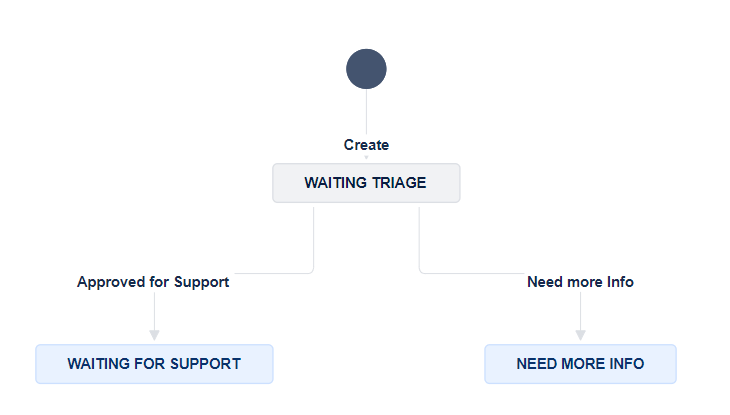
If the ticket lacks essential details, it’s transitioned to ‘Need More Info‘. If it has all the required information, it’s transitioned to ‘Waiting for Support‘. This automatic sorting is applied right after the ticket is created, during the triage phase, significantly optimizing the ticket management workflow by ensuring that agents can focus on tickets that are ready for action.
A Peek into the Code
MODEL = "gpt-3.5-turbo"

def check_status_and_transition_issue(string, issue):
    if "Status: Need info" in string:
        issue.add_comment(string)
        issue.transition(transition='Need more Info')
    elif "Status: Approved" in string:
        issue.add_comment(string)
        issue.transition(transition='Approved for Support')
    else:
        issue.add_comment("It was not possible to identify if needs more info or it was ready to work", True)
client = openai.Client(api_key=env['OPENAI_API_KEY'])
response = client.chat.completions.create(
  model=MODEL,
  messages=[
    {
      "role": "system",
      "content": "You are a service desk agent responsible for verifying whether the tickets entering the service desk contain all the necessary information to address the IT request or not. Based on the provided information, such as title and description, you must assess whe the more information is needed or if the submitted data is already sufficient to address the ticket. Your response will be for the client, be professional and polite. Don't ask for User ID or Email Address, we already have it. Whenever possible, say the the person\'s name .\n\nTicket Example:\n\nTicket Title: VPN Connection Problem\n\nTicket Description: I have been trying to connect to the company's VPN for over an hour and constantly receive the error message \"Connection failed\". I have tried restarting the VPN application and also my computer, but the problem persists.\n\nSystem Response (as Service Desk Agent):\n\nThe information provided is a good starting point, but for more efficient and directed service, it would be helpful to have the following additional information:\n\nVPN Application Version: To check if there is compatibility with the current operating system or if an update is needed.\nOperating System and Version: To identify if there are known issues with specific OS configurations.\nExact Time of the Problem: This can help to verify if there was a problem in the network at the specific time.\nExact Error Message: Although \"Connection failed\" was mentioned, any error code or additional detail could help in the diagnosis.\nIf possible, screenshots of the error: Images can provide additional insights into the problem.\n\nStatus: Need info.\n\nIf you identify that the ticket has enough details, you can say.\n\nThank you for your ticket. I have reviewed it and believe it may contain sufficient information to address the issue and will be forwarding the ticket to one of our agents.\n\nStatus: Approved."
    },
    {
      "role": "user",
      "content": f"Here is a ticket to be evaluated: Title: {issue.fields.summary}\nDescription: {issue.fields.description}. The reporter who submitter the ticket is {issue.fields.reporter.displayName}"
    }
  ],
  temperature=0.41,
  max_tokens=256,
  top_p=1,
  frequency_penalty=0,
  presence_penalty=0
)
check_status_and_transition_issue(response.choices[0].message.content, issue)
In the settings, Easy for Jira took care to provide you with a place to register environment variables (like API Keys and passwords) within the plugin itself. In this case, I registered my OPENAI_API_KEY.

The Simplified Workflow
Here is the workflow I used in the example:
Validating the Solution
Now let’s get to the result of this small 30-line script.
Below are two very basic tickets created, obviously lacking information for an agent to start working. Note that immediately after the ticket is created, ChatGPT springs into action to work as a ticket qualifier and perform the ticket transition.
#1 Example:

- A small summary of the issue
- Description of the issue (one that agents would love to receive, without any context)
- Response from ChatGPT 3.5 as a comment for the customer.
- The ticket transitioned to ‘Need More Info’ status successfully because it lacked sufficient information for the agent.
#2 Example:
Here is another example of a request for admin access. Note the perfect response from the model. 🧠

Can you perceive how much efficiency this generates within a company?
Again, this is a very simple example, we could include fields from the incident creation form or even which asset is being affected (if the user responds) and send it along to the ChatGPT prompt for it to have more information and see if the ticket is acceptable or not.
For this specific case, I utilized ChatGPT-3.5, but I anticipate even more impressive results with the application of ChatGPT-4, given its advanced capabilities. Or you can have multiple types of different agents for different types of requests. You can also point to OpenAI Assistants for a better context, and technical documentation of the company, and much more!
As I’ve mentioned in a previous post What skills do I need to become an Atlassian Expert?, possessing Python skills is becoming increasingly essential, not just for those involved in software development but for virtually anyone navigating the digital landscape.
Conclusion
Easy for Jira stands out as a quintessential tool that significantly extends Jira’s functionality, transforming it into a more powerful and versatile platform. The ability to integrate complex scripting directly into Jira’s workflows opens up endless possibilities for automation and innovation, making it a must-have plugin for those looking to maximize their Jira investment.
 Atlassian Expert Tips