- Jira Components
- Enhancing Developer Experience with Compass
- Switching to Compass Components
- Creating a new Compass Component
- Compass Components and JSM Services
- Workflow of Information
Jira Components
Jira components are building blocks within Jira projects, helping teams categorize and manage issues more effectively. These components can represent different modules of your software, such as “Frontend” and “Backend,” allowing for a more organized tracking system of bugs, features, and improvements.
Enhancing Developer Experience with Compass
Switching to Compass from traditional Jira components offers developers a comprehensive view of software architecture, enhancing collaboration and efficiency. Benefits include:
- Reduced context switching with a unified software catalog.
- Deployment tracking through scorecards and metrics.
- Integration with internal and external tools.
- Streamlined component creation via customizable templates.
Switching to Compass Components
To transition from Jira components to Compass components, you’ll first need to familiarize yourself with the Compass platform, which aims to provide a more integrated and comprehensive view of your software architecture. Begin by exploring Compass and understanding how it can complement your existing use of Jira.
Next, identify which components in your Jira projects correspond to broader architectural elements in Compass, such as services, libraries, or applications. This understanding will guide the migration of your Jira components into the more granular and structured format that Compass offers.
The actual switch involves mapping your existing Jira components to the relevant Compass component types and then gradually transitioning your team to start referencing these Compass components in your workflows and documentation.
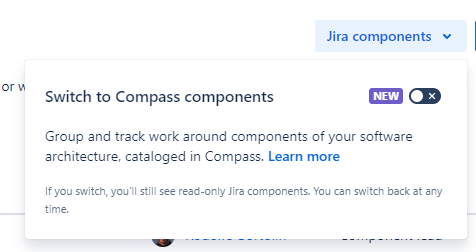
To enable Compass Components to the project, go the the Components page of the Jira Software project, in the top right corner, you will have the option to use Compass Components instead of Jira Components:
Creating a new Compass Component
To better grasp the diversity of components in Compass, it’s essential to explore each type with examples.


Services: These are independently deployable units, often corresponding to backend services, microservices, or system parts providing functionality via APIs. Examples include Authentication Services, Payment Processing Services, and Email Services.

Capabilities: Representing high-level product functionalities, capabilities offer value directly to end-users, such as User Authentication Systems, Payment Processing Systems, and Notification Services.

Libraries: Collections of pre-written code that simplify common programming tasks, like String Manipulation Libraries, Data Visualization Libraries, and Machine Learning Libraries.

Applications: Complete, user-facing software solutions that operate on web servers, mobile devices, or desktops, like Mobile Apps, Desktop Applications, and CLI Tools.

Cloud Resources: Components managed by cloud providers, including Compute Instances, Managed Databases, and Storage Services.

Data Pipelines: Sequences of data processing tools and procedures, such as ETL Pipelines, Real-time Data Streaming, and Batch Data Processing Jobs.

Machine Learning Models: Algorithms trained to perform specific tasks, like Recommendation Systems, Fraud Detection Models, and Image Recognition Models.

UI Elements: Reusable components of user interfaces, including Date Pickers, Modal Dialogs, and Navigation Menus.

Websites: Various web properties managed by an organization, from Corporate Landing Pages to Support Portals and Marketing Campaign Sites.
Choosing Between Services and Capabilities
The decision to categorize a component as a “Service” or a “Capability” depends on its role within the architecture and its intended consumption and management:
- Capabilities are used to define end-user features and functionalities that offer direct business value, suitable for tracking on product roadmaps.
- Services are designated for deployable units with specific operational needs and are typically managed by designated teams responsible for their maintenance and performance.
For example, suppose you have a microservice for handling user authentication. In that case, you’d categorize this as a “Service” since it’s a deployable unit that operates in the background and has specific operational requirements. However, if you have a “User Management” feature in your application that allows end-users to manage their profiles, preferences, and security settings, you would categorize this as a “Capability” because it represents the user-facing functionality of the system.
In practice, a single “Capability” could be supported by multiple “Services.” For instance, a “Checkout” capability in an e-commerce application might be underpinned by a Payment Processing Service, an Inventory Management Service, and a User Account Service. Thus, Capabilities tend to be more aligned with what the user experiences directly, while Services are more about the technical implementation that supports these experiences.
Compass Components and JSM Services
You must be thinking, now with all these options of component types, don’t they overlap with JSM Services? And the answer is yes, and precisely because of that, there is a synchronization between these two.
When creating a Service in JSM, you must now choose whether the service is the type Software Services, Capabilities, or Application and they will be automatically synchronized with components of the same type in Compass. Business service types in Jira Service Management are not synchronized, as Compass does not possess that type.
Note: If you create the Service in Opsgenie, it will automatically be of type Software Services

Notice that a label is added in the Component within the Compass, and which information is synchronized.
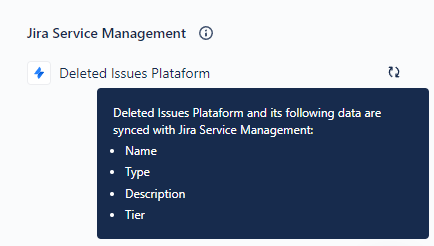
Compass and JSM together offer a powerful combination for managing both the development and operational aspects of software projects. While Compass focuses on the architectural and development side, providing teams with the tools to define, visualize, and manage their software components, JSM addresses the operational needs by facilitating issue tracking, customer service, and incident management.
This synergy is particularly beneficial in environments that adopt a “You Build It, You Run It” DevOps mentality, where a software team is responsible for both the development and operational aspects of their components.
Workflow of Information
Here is a flowchart diagram detailing how various Atlassian products and services are interconnected, specifically focusing on Compass Components and Services from Opsgenie.

Note: Originally, Services were only from Opsgenie, nowadays these softwares are so interconnected that it’s hard to tell which one is the real “owner” of the functionally. In this flow of information, I chose to leave it in OpsGenie.
Jira Service Management
At the heart of this workflow lies Jira Service Management, which acts as a command center for incident resolution. Within its realm, ‘Affected Services’ signify the focal point around which incidents are reported and resolved. ‘Projects’ within JSM house these incidents, with ‘Teams’ managing them. Each service impacted by an incident is monitored, ensuring any disruptions are swiftly addressed. Moreover, ‘Change Approvers’ play a pivotal role within JSM, providing a governance layer to oversee any modifications proposed for these services, thus maintaining a balance between agility and system integrity.
Compass
Moving onto Compass, Components act as the nexus of service information. They encompass everything from ‘Dependencies’ to ‘Scorecards’, which offer comprehensive insights into the service’s performance and interconnectedness with other Components. These components link directly to JSM’s ‘Affected Services’, thereby establishing a bridge between the architectural aspects of a service and its operational status.
Confluence
Confluence stands as the repository of documentation. It’s where the foundational knowledge of a service is crafted and curated. Each ‘Capability’, ‘Service’, Application’, or any other Component Type is documented in Confluence. This knowledge is then pipelined directly into Compass Components, forging a link that ensures that every team member operates from a unified, informed perspective.
Opsgenie
Opsgenie enters the fray as the guardian of service reliability, with its ‘On-Call’ schedules ensuring that ‘Responders’ are always at the ready. These ‘Service Owners’ (Opsgenie Teams), are the first line of defense against service interruptions. They not only react to incidents but also proactively manage the health of services, empowered by integrations with other tools like PagerDuty, Zabbix, New Ralic and many others.
Bitbucket
Lastly, the ‘Repositories’ in Bitbucket are the starting blocks of any service, housing the code that will eventually be deployed. These ‘Deploys’ transition from code to a live environment, bringing services to life. Creating a cyclical workflow where deployment, monitoring, and documentation are in constant interaction.
 Atlassian Expert Tips
The article is very helpful, especially the flowchart. Thank you, Rodolfo!
LikeLiked by 1 person