
Atlassian’s Irony 😮
Not too long ago, Atlassian found itself in a peculiar situation – despite being the backbone for teams across various industries, it lacked a dedicated space within its platform to manage and assign issues to teams. Previously, implementations were limited to simple select lists (single choice or multiple choices) or groups containing team names. This method was not ideal as it offered limited functionality, lacking the ability to manage team dynamics effectively. This was an ironic twist, considering all of Atlassian’s products are designed with team collaboration in mind.
Team Management with Jira Assets 🌟
To bridge the gap created by this limitation, the enhanced capabilities of managing assets within Jira Service Management have emerged as a game-changer. In recent implementations, which I have also been a part of, we now see teams stored as assets and all users in Jira treated as objects. This approach became feasible after asset management in the cloud evolved to match the dynamism previously only available in on-premises environments. Many have turned to using Assets as the go-to functionality for storing and managing teams, and the results have been impressively effective.
Challenges of Diverse Functionalities in Atlassian 🤔
In recent months, Atlassian has introduced and continuously improved a feature called Atlassian Teams, which enhances how teams are stored and managed. Originating from Plans, formerly known as Advanced Roadmaps, this feature is now being integrated as a global component within the platform.
While the recent enhancements to Atlassian Teams have made this functionality more popular, these advancements come with their own set of challenges. Now, there are three distinct functionalities for team registration within the Atlassian suite: Atlassian Teams, Opsgenie Teams, and Teams as Assets. Although this diversity offers more options, it also introduces additional administrative overhead and potential overlaps in certain areas. Furthermore, if you use the Tempo plugin, you’ll find yet another place where teams need to be managed.
This situation has created a sort of “competition” within the platform regarding which team setting to use: Atlassian Teams or Teams as Assets for those utilizing Jira Service Management? This choice poses a strategic decision for admins, balancing functionality with operational efficiency.
Best Practices for Team Functionality 🛠️
Teams as Assets

Ideally utilized exclusively for Jira Service Management (JSM) projects, providing a structured approach to ticket assignments and streamlining the support workflow, which is crucial for service and support teams. This is especially beneficial for larger enterprises where Teams as Assets can significantly enhance reporting capabilities. By creating custom attributes for each team, organizations can develop complex automation (with Automation for Jira) to manage approvals more efficiently and establish dedicated queues. Such configurations ensure that users only see the issues in the queues pertinent to the teams they belong to, enhancing both clarity and efficiency.
Atlassian Teams
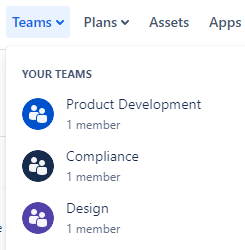
Try to reserve for Software or Business Teams. This functionality is well-suited for managing tasks and collaborations that involve code creation, project tracking, and business areas. It is particularly beneficial if you want to grant autonomy to your users to self-manage their teams. Users can add and remove team members and have a dedicated page for their team management. This approach works very well and is certainly a better option than a simple select list, offering a more dynamic and user-driven experience. Keep in mind that Atlassian is continually improving this functionality and integrating it with other tools, like Compass, enhancing its utility and making it even more robust.
While I appreciate that teams can establish their own identities and links, here are a few caviats:
- The absence of API endpoints to manipulate team settings is disappointing.
- Atlassian teams are at the ORG level (not site) which introduces risks if someone from instance B, deletes an Atlassian Team from that belongs to instance A. This only affects enterprise customers.
- When you migrate from DC staging to sandbox, it will create the teams in Production 🤡
- Any user who is part of the team can rename, delete, and do whatever they want with the team. 🤡
Opsgenie Teams
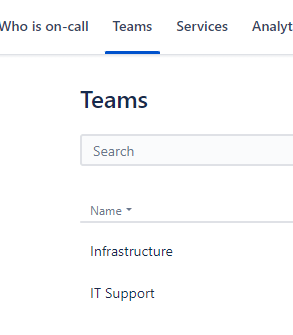
Designed for teams that deal with alerts and on-call responsibilities. Although there might be some overlap with Teams as Assets, especially for teams that handle incident response, the scope of Opsgenie Teams is generally more focused and limited in number.
By delineating these categories, I believe you can maximize the resources available across these platforms while adhering to best practices for setup and management. This division not only clarifies the purpose of each team functionality type but also ensures that you’re leveraging Atlassian’s toolkit to its fullest potential, fostering an environment where teams can thrive and deliver their best work.
Future Outlook🔮
I’m glad that Atlassian is looking closer into improving Atlassian Teams, however, it will be difficult to compete with how dynamic and powerful teams in assets can be, especially at the enterprise level where different metrics and automation can be executed.
At some point, Atlassian will unify Opsgenie Teams with the standard Atlassian teams, resulting in a centralized team management hub. In such a scenario, especially for Jira Service Management implementations, we would shift from managing teams across three places down to two (Atlassian Teams and Teams as Assets).
Why still two? Because I still don’t see features in Atlassian Team that would allow me to avoid using Teams as Assets.
Ideally, I would like Atlassian Teams to be synchronized with assets (🤞), similar to how services are currently integrated with Compass components (explained here). The ability to create customizable attributes and linked objects would enhance automation capabilities, thereby leveraging the best of all worlds.
 Atlassian Expert Tips
Very good overview of the problems with teams in Atlassian. I wish there would be at least the possibilty from Assets side to add a teams type attribute just to have a central hub of teams used in a bigger scope – those that have a corresponding object and are therefore used in JSM projects. This could be the bare minimum “bridge” of those different Teams functionalities.
Also as a bonus having API endpoints to manipulate teams is absolutely crucial to eliminate the risk of self managed teams getting out of hand which may result in a lot of confusion.
LikeLiked by 1 person