Introduction
Welcome to the future of customer service, where Artificial Intelligence (AI) is set to revolutionize how we evaluate and enhance customer interactions. This solution is designed to address significant gaps in traditional customer service evaluation methods, aiming to deliver a smarter, more efficient, and unbiased approach to understanding customer satisfaction and agent performance.
The Limitations of Traditional Customer Satisfaction Surveys
Overview
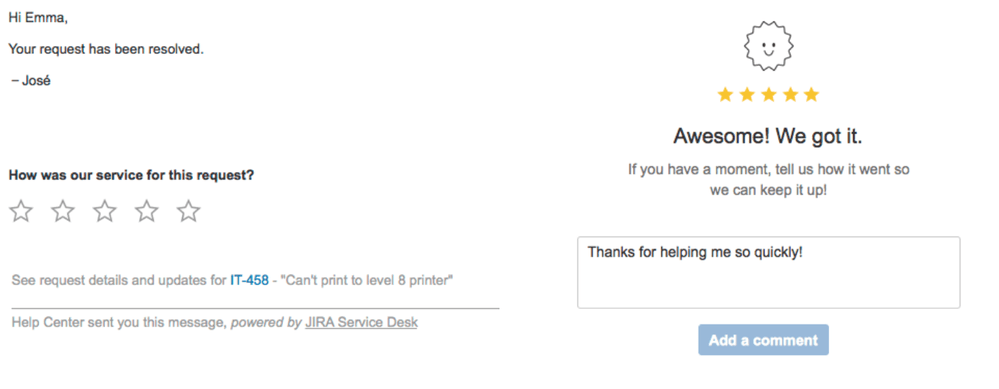
Customer satisfaction has traditionally been gauged using surveys that ask customers to rate their service experience. These have been pivotal in helping businesses understand their customers’ satisfaction levels.
Key Limitations
Response Rates and Bias
Traditional surveys often suffer from low response rates and biased responses, leading to skewed data that may not represent the entire customer base accurately. This can be attributed to various factors such as survey fatigue, lack of motivation to respond, or limited accessibility. As a result, the insights gathered from such surveys may not truly reflect the sentiments and opinions of the broader customer population.
Resource Intensity
The labor and time required to process and analyze survey results can be substantial, often diverting resources from other critical customer service functions. This task not only demands dedicated manpower but also a significant allocation of time and energy.
How can AI help with this?
Artificial Intelligence can significantly enhance the evaluation of customer-agent interactions by automating the process and providing more precise and unbiased insights. Specifically, I have developed an automation that analyzes all interactions between agents and customers based on criteria stored in custom fields as select lists in Jira. As soon as a ticket is resolved, this automation is triggered to evaluate the interactions using these criteria, and the results are populated in the custom fields.
The criteria, which include aspects like response time, communication clarity, and professionalism, are defined in select lists and in the Prompt. This means you can modify the criteria, the options within them, and the conditions that trigger the evaluation according to your specific needs. This setup not only streamlines the process of evaluating customer service interactions but also ensures that the performance assessments are data-driven and free from human biases.
The purpose of this post is to demonstrate another innovative application of AI in improving operational efficiency and accuracy in customer service evaluations within Jira. This automation represents a step forward in using AI to harness deeper insights into agent performance and customer satisfaction, thereby enabling businesses to deliver exceptional customer service consistently.
Here are screenshots of the result of what we will build going forward:
#1 Fields populated by AI with the assessment of the interaction of the agent with the end user.

#2 A final comment explaining the reason AI chose these values and how the customer could have improved his support on that ticket.

Detailed Evaluation Criteria
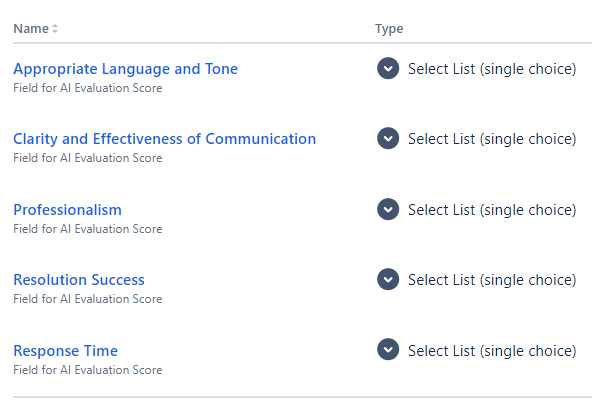
In designing this AI-powered performance evaluation system, I have chosen the following evaluation criteria that comprehensively assess most of the aspects of agent-customer interactions.
- Response Time: Assesses the speed at which agents respond to customer inquiries from the moment a ticket is opened and every interaction. This helps gauge the efficiency and promptness of the service team.
- Clarity and Effectiveness of Communication: Evaluate how well agents communicate with customers. This includes assessing the clarity of the agent’s responses and their ability to resolve the customer’s issues effectively
- Appropriate Language and Tone: Focuses on the professionalism of the language and tone used during interactions. It’s crucial that communications are polite, respectful, and customer-centric to maintain a high standard of customer service.
- Professionalism: Reviews the overall demeanor and conduct of agents during interactions. This includes assessing their courtesy, empathy, and professionalism, which are vital for building trust and rapport with customers.
- Resolution Success: Measures the effectiveness of the resolution provided. This criterion looks at whether customer issues are resolved in a timely manner on the first attempt without needing further follow-ups or escalations.
Best Practices for Service Desk Support
Before we jump on how to implement the solution, it’s important to know some good practices of how to provide good support. And here you can revisit some of your Atlassian tickets to understand how they do it. You will see that the use some of these practices.
- Acknowledge and Understand the Issue: As soon as the ticket is picked up, the agent should acknowledge receipt and confirm understanding of the customer’s issue (usually called the “First time to response” SLA). This can be done through a comment or email stating that they have reviewed the problem and are working on it.
- Maintain Clear Communication: Regularly update the customer on the status of their ticket. If an issue takes longer to resolve, keep the customer informed about what is being done to address their problem.
- Be Empathetic and Courteous: Always engage with the customer in a polite and empathetic manner. Understand that the issue might be frustrating for them and express genuine concern and a willingness to help.
- Verify All Information: Ensure all the information regarding the issue is correct. This includes verifying user details, the problem description, and any error messages. Ask clarifying questions if necessary.
- Provide Detailed, Step-by-Step Solutions: When offering a solution, be clear and detailed. Provide step-by-step instructions if the solution requires customer action, and ensure these are easy to understand.
- Summarize the Solution: At the close of a ticket, summarize the problem and the solution provided. This not only confirms that the issue has been resolved to the customer’s satisfaction but also helps maintain clear records for future reference.
- Offer Additional Support: Let the customer know how they can reach out if the problem recurs or if they have further issues. Provide them with contact information or directions on how to submit another ticket.
Step-by-Step Implementation of Automation in Jira
To deploy this AI-driven system for evaluating customer satisfaction and agent performance using Jira, follow these steps meticulously to ensure seamless integration and functionality:
Step 1: Setting Up Custom Fields
First and foremost, create these custom fields in Jira. These is where the AI will store the values for each ticket, use the type of field Select List (single choice)..
- Response Time:
- Options: Immediate, Prompt, Acceptable, Delayed, Unacceptable
- Clarity and Effectiveness of Communication
- Options: Crystal Clear, Clear, Adequate, Unclear, Confusing
- Appropriate Language and Tone
- Options: Exemplary, Appropriate, Adequate, Inappropriate, Unacceptable
- Professionalism
- Options: Outstanding, Highly Professional, Professionally Adequate, Somewhat Professional, Unprofessional
- Resolution Success:
- Options: Fully Resolved, Mostly Resolved, Partially Resolved, Unresolved
Step 2: Configuring The Automation Rule


Send Web Requests (to get Custom Field Options)
Web Request URL: https://domain.atlassian.net/rest/api/3/field/customfield_10075/context/10180/option
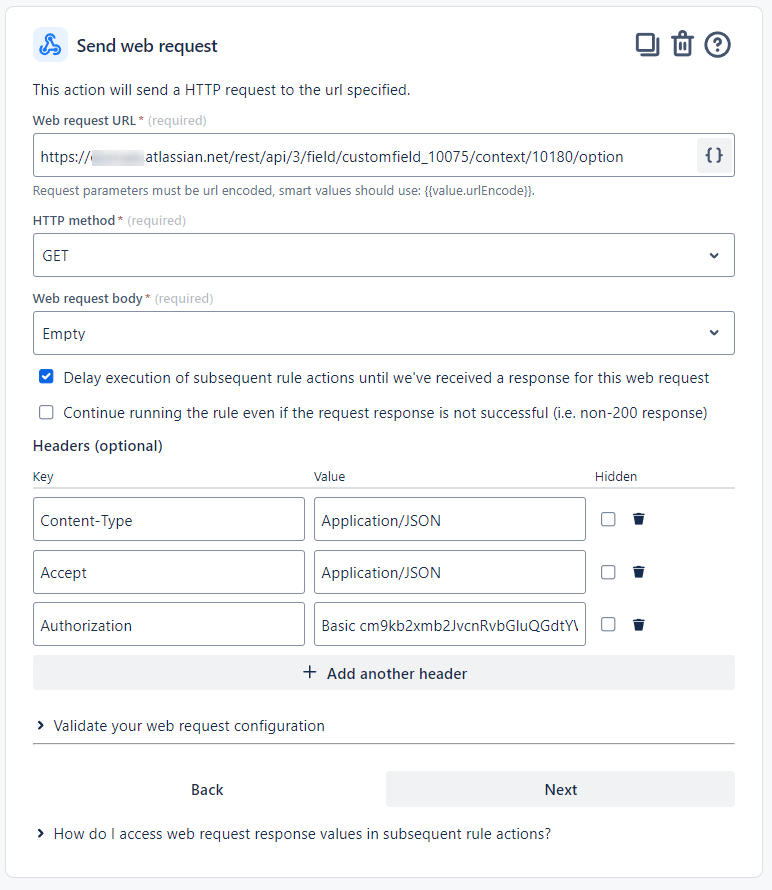
Where customfield_10075 is the ID of the customfield and 10180 is the ID of the context (you can find them in the URL when you edit the customfield)
Create Variables {{ResponseTime}}, {{Clarity}}, {{LanguageTone}}, {{Professionalism}}, {{ResolutionSuccess}}
These variables are crafted using smart values to compile a list of options, where each criteria’s name and ID are formatted in a way that can be understood by OpenAI. This is how they were formatted:
The smart value: {{#webResponse.body.values}} Value: {{value}} ID: {{id}}, {{/}}

Create Variable {{prompt}}:
Sets up the prompt to be sent to OpenAI. It includes the list of criterias with their options, the response format, and instructions,
The prompt instructs OpenAI to respond with the fields options IDs that are most suitable for the ticket.
You are programmed to act as an evaluation assistant, analyzing customer service interactions and overall ticket handling. Utilizing the content created by the customer and the subsequent communication logs, ChatGPT will assess the following criteria:
\n\n
– Response Time: Evaluates how quickly agents respond to customer inquiries from the time a ticket is opened until the first response is made. This metric helps measure the efficiency and promptness of the service team.
— Options for Response Time: {{ResponseTime}}
\n\n
– Clarity and Effectiveness of Communication: Assesses the clarity and effectiveness of agents’ communications with customers. This includes the ability to convey clear messages and resolve customer issues effectively. Also making sure that the agent is related to what is in the summary and description.
— Options for Clarity and Effectiveness of Communication: {{Clarity}}
\n\n
– Appropriate Language and Tone: Examines the professionalism of language and tone used during interactions. It’s critical that communications are polite, respectful, and centered around the customer to maintain high service standards.
— Options for Appropriate Language and Tone: {{LanguageTone}}
\n\n
– Professionalism: Reviews agents’ demeanor and conduct during interactions, focusing on courtesy, empathy, and overall professionalism, which are crucial for building trust and rapport with customers.
— Options for Professionalism: {{Professionalism}}
\n\n
– Resolution Success: Measures the effectiveness of the resolution provided. This criterion evaluates whether customer issues are resolved promptly and effectively on the first attempt, without the need for further follow-ups or escalations.
— Options for Resolution Success: {{ResolutionSuccess}}
\n\n
DO NOT make up new criterias or options
Your response SHOULD have this format, as a example: \n\n
\n\n
||Response Time: ID|| \n
||Clarity and Effectiveness of Communication: ID|| \n
||Appropriate Language and Tone: ID|| \n
||Professionalism: ID|| \n
||Resolution Success: : ID|| \n\n
\n\n
Make sure you give me only the ID (for example: 10112 and not “Immediate”
ID is the Id of the option that I provided in the criterias
\n\n
I’ll give you the ticket details in my next prompt, ok?
Send Web Request (to get Comments)
Web Request URL: https://your-domain.atlassian.net/rest/api/3/issue/{{issue.key}}/comment
The response from this call is used in the next variable {{ticket}}:
{{#webResponse.body.comments}} {{created}} — {{author.displayName}}: {{#body.content}}{{content.text}} \n{{/}}, {{/}}
Create Variable {{ticket}}:
Reporter: {{issue.fields.reporter.displayName}} \n
Assignee: {{issue.fields.assignee.displayName}} \n
Summary/Title of the ticket: {{issue.fields.summary}} \n
Description: {{issue.fields.description}} \n
The tickets resolution was set to : {{issue.fields.resolution.name}} \n
Interactions: \n
{{#webResponse.body.comments}} {{created}} — {{author.displayName}}: {{#body.content}}{{content.text}} \n{{/}}, {{/}}
Send Web Request (to OpenAi)

{
    "model": "gpt-3.5-turbo",
    "temperature": 0,
    "messages": [
        {
            "role": "user",
            "content": "{{prompt.jsonEncode}}"
        },
        {
          "role": "assistant",
          "content": "OK."
        },
        {
          "role": "user",
           "content": "Here is the ticket for your evaluation\n\n: {{ticket.jsonEncode}}"
        }
    ]
}
Edit the Fields
{
  "fields": {
	"Response Time":{"id": "{{webResponse.body.choices.get(0).message.content.match("Response Time: ([^||]*)").trim()}}"},
	"Clarity and Effectiveness of Communication":{"id": "{{webResponse.body.choices.get(0).message.content.match("Clarity and Effectiveness of Communication: ([^||]*)").trim()}}"},
	"Appropriate Language and Tone":{"id": "{{webResponse.body.choices.get(0).message.content.match("Appropriate Language and Tone: ([^||]*)").trim()}}"},
	"Professionalism":{"id": "{{webResponse.body.choices.get(0).message.content.match("Professionalism: ([^||]*)").trim()}}"},
	"Resolution Success":{"id": "{{webResponse.body.choices.get(0).message.content.match("Resolution Success: ([^||]*)").trim()}}"}
  }
}
Create Variable {{OpenAIReponse}}
We need to save the response generated by OpenAI to use in a new prompt in a new call.
- Smart Value: {{webResponse.body.choices.get(0).message.content}}
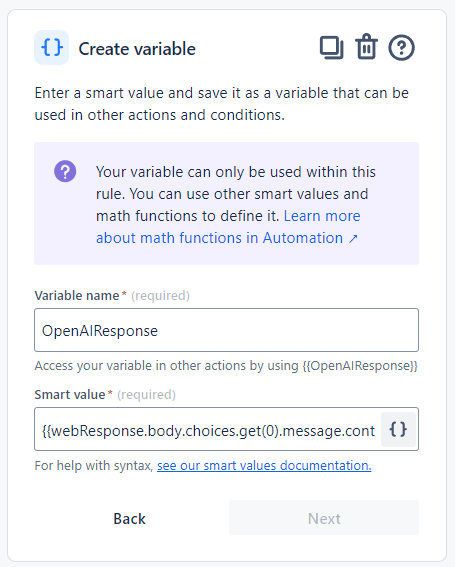
In this next prompt, we will send the content of the last request, the response from Open AI that was sent previously, and new instructions for the model to explain to us what led it to decide on the previous criteria. Note that this is basically the same prompt as before, but now I’m sending back the AI previous response and asking for more information. Essentially, this is like a continuation of your conversation, pretty much like the ones you have in a chat with ChatGPT.
{
    "model": "gpt-3.5-turbo",
    "temperature": 0,
    "messages": [
        {
            "role": "user",
            "content": "{{prompt.jsonEncode}}"
        },
        {
          "role": "assistant",
          "content": "OK."
        },
        {
          "role": "user",
           "content": "Here is the ticket for your evaluation\n\n: {{ticket.jsonEncode}}"
        },
        {
          "role": "assistant",
           "content": "{{OpenAIResponse.jsonEncode}}"
        },
        {
          "role": "user",
           "content": "Explain the reason you chose the options and how (if that is the case) the agent could have done better, explaining for the agent who made the interactions. I don't need to see the IDs for each criteria in the response. Use this format: ||Criteria: option : answer ||"
        }
    ]
}
And finally, creating an internal comment on the ticket with the detailed explanation:
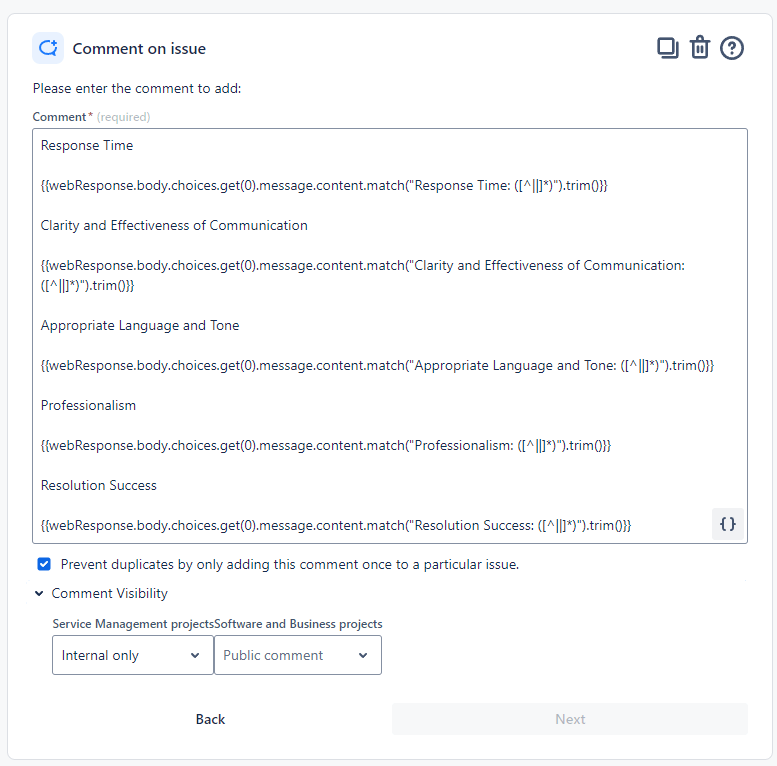
Response Time
{{webResponse.body.choices.get(0).message.content.match(“Response Time: ([^||]*)”).trim()}}
Clarity and Effectiveness of Communication
{{webResponse.body.choices.get(0).message.content.match(“Clarity and Effectiveness of Communication: ([^||]*)”).trim()}}
Appropriate Language and Tone
{{webResponse.body.choices.get(0).message.content.match(“Appropriate Language and Tone: ([^||]*)”).trim()}}
Professionalism
{{webResponse.body.choices.get(0).message.content.match(“Professionalism: ([^||]*)”).trim()}}
Resolution Success
{{webResponse.
Response Time
{{webResponse.body.choices.get(0).message.content.match(“Response Time: ([^||]*)”).trim()}}
Clarity and Effectiveness of Communication
{{webResponse.body.choices.get(0).message.content.match(“Clarity and Effectiveness of Communication: ([^||]*)”).trim()}}
Appropriate Language and Tone
{{webResponse.body.choices.get(0).message.content.match(“Appropriate Language and Tone: ([^||]*)”).trim()}}
Professionalism
{{webResponse.body.choices.get(0).message.content.match(“Professionalism: ([^||]*)”).trim()}}
Resolution Success
{{webResponse.body.choices.get(0).message.content.match(“Resolution Success: ([^||]*)”).trim()}}
body.choices.get(0).message.content.match(“Resolution Success: ([^||]*)”).trim()}}
Advantages of This Solution
Automated Efficiency ⚙️
This solution automates the entire evaluation process, analyzing interactions more quickly and consistently than humans, thus reducing time and labor costs.
Data-Driven Insights 📊
The integration of ChatGPT offers a transformative approach to gaining in-depth insights into agent performance and customer satisfaction. By harnessing the power of ChatGPT alongside EazyBI, your organization can unlock the potential to forecast future trends and identify key focus areas for your team.
Real-Time Feedback ⏱️
This solution provides real-time feedback directly to agents, unlike traditional methods, facilitating immediate improvements and accelerated learning.
Conclusion
The transformative potential of this AI-powered performance evaluation system on customer service operations is profound. By driving efficiencies, providing actionable insights, and facilitating real-time improvements, this solution is poised to redefine the future of customer experience and agent performance evaluation, anticipating the needs of tomorrow’s customers today.
 Atlassian Expert Tips