
I’m always looking for ways to optimize and automate workflows. Recently, I developed a solution that leverages the power of Heroku and Jira Automation to streamline the process of responding to customer inquiries. This post will walk you through the script I created, which automatically posts comments on Jira issues based on JSM Related Articles.
How the Script Works
The script checks the knowledge base (KB) articles suggested by Jira Service Management (JSM) and reads the text of these articles. It then inserts this text into the prompt so that the artificial intelligence can use the KB content to generate a response. This way, the automatic responses are informed and accurate, based on the most relevant information available in the KB.
Pre-requisites
Before deploying this solution, ensure that your knowledge base is well-structured and populated with relevant articles. The script relies on these articles to construct accurate and helpful responses.
Script Overview
from flask import Flask, request, jsonify
import json
import requests
import os
import re
from bs4 import BeautifulSoup
from openai import OpenAI

app = Flask(__name__)

MODEL = "gpt-4o"

response_format_1 = """
Hi [Customer's Name],

Thank you for reaching out to us regarding the issue with logging into your account. I understand this must be frustrating, and I apologize for any inconvenience caused.

Based on your description, it sounds like this could be related to [a brief description of the suspected issue, e.g., a recent system update, credentials problem, etc.]. To address this efficiently, I have a couple of questions:

Have you recently updated any login details or account settings?
Are there any specific error messages when you attempt to log in? If yes, could you please provide a screenshot?
In the meantime, here are a few steps that often help resolve similar issues:

Update your browser to the latest version.
Clear your browser's cache and cookies.
Try accessing your account using a different browser or device.
Please try these steps and let me know the outcome. If they solve the problem, you can click the "Resolve" button to close this ticket. If the issue persists, please reply to this message with your answers to the above questions, and we will continue to assist you.

Looking forward to your response.

Best regards,

Service Desk AI Agent
"""

response_format_2 = """
Hi [Customer's Name],

Thank you for reaching out to us regarding your need to update your profile information. I'm here to help!

<explanation of what the customer is requesting>

If you encounter any issues or have further questions, please do not hesitate to contact us again. We are always here to assist you!

Looking forward to your response.

Best regards,

Service Desk AI Agent
"""

def clean_text(text):
    cleaned_text = re.sub(r'\n+', '\n', text)
    return cleaned_text

def convert_to_adf(text):
    # Split the text into paragraphs based on double newlines
    paragraphs = text.split('\n\n')

    # Initialize the content structure for ADF
    adf_content = {
        "body": {
            "content": [],
            "type": "doc",
            "version": 1
        }
    }

    for paragraph in paragraphs:
        # Create a list to hold the content of the current paragraph
        paragraph_content = []

        # Split the paragraph into parts based on bold markers (**)
        parts = re.split(r'(\*\*.*?\*\*)', paragraph)

        for part in parts:
            if part.startswith('**') and part.endswith('**'):
                # It's a bold part, remove the markers and format as bold
                bold_text = part[2:-2]
                paragraph_content.append({
                    "type": "text",
                    "text": bold_text,
                    "marks": [
                        {
                            "type": "strong"
                        }
                    ]
                })
            else:
                # It's a normal text part
                paragraph_content.append({
                    "type": "text",
                    "text": part
                })

        # Add the current paragraph to the ADF content
        adf_content["body"]["content"].append({
            "type": "paragraph",
            "content": paragraph_content
        })

    # Convert the ADF content to a JSON string
    adf_json = json.dumps(adf_content, indent=2)
    return adf_json

def fetch_articles(summary, HEADERS_EXP, BASE_URL):
    url = f"{BASE_URL}/rest/servicedeskapi/knowledgebase/article?query={(summary)}&highlight=false"
    try:
        response = requests.get(url, headers=HEADERS_EXP)
        response.raise_for_status()
        articles = response.json()['values']
        return articles
    except requests.exceptions.RequestException as e:
        print(f"Failed to fetch articles from JSM: {e}")
        return []

def respond_to_customer(OPENAI_API_KEY, content, summary, description, reporter):
    client = OpenAI(api_key=OPENAI_API_KEY)
    try:
        response = client.chat.completions.create(
            model=MODEL,
            messages=[
                {"role": "system", "content": "You are a service desk agent responsible for handling customer inquiries."},
                {"role": "user", "content": f"To answer the inquiry, you need to check the content I'll provide you which is from our knowledge base, keep in mind that the articles are in the order of what apparently the customer is asking:\n\n{content}.\n\nYour signature should always be 'Best regards,\nService Desk AI Agent\n\nThe response should be professional and cordial like these examples (you don't need to follow that exact same format):\n\n{response_format_1}\n\n{response_format_2}. \n\nIf you don't know the answer or didn't understand the question, just tell the customer that you are goinf to escalate the isso to one of our human agents."},
                {"role": "assistant", "content": "Sure, I'll look into this for you right away. Can you please provide the details of the ticket?"},
                {"role": "user", "content": f"Sure, the summary of the ticket is: {summary}.\n\nThe description is:\n\n{description}.\n\nThe ticket was reported by {reporter}."}
            ],
            temperature=0.2,
            top_p=1,
            frequency_penalty=0,
            presence_penalty=0
        )
        return response.choices[0].message.content
    except Exception as e:
        print(f"ERROR: An error occurred: {e}")
        return ""

def post_comment(issue_id, comment, headers, BASE_URL):
    payload = ""
    url = f"{BASE_URL}/rest/servicedeskapi/request/{issue_id}/comment"
    payload = json.dumps({
        "body": comment,
        "public": True
    })
    try:
        response = requests.post(url, headers=headers, data=payload)
        response.raise_for_status()
        print("Comment posted successfully")
    except requests.exceptions.RequestException as e:
        print(f"Failed to post comment: {e}")

    return payload

@app.route('/process', methods=['POST'])
def process_event():
    event = request.get_json()
    summary = event['summary']
    description = event['description']
    reporter = event['reporter']
    BASE_URL = event['BASE_URL']
    issue_key = event['issue_key']

    AUTHORIZATION = request.headers.get('Authorization')
    OPENAI_API_KEY = request.headers.get('Openai-Api-Key')

    HEADERS_EXP = {
        'Accept': 'application/json',
        'X-ExperimentalApi': 'opt-in',
        'Content-Type': 'application/json',
        'Authorization': f"Basic {AUTHORIZATION}",
        'Connection': 'keep-alive',
        'Accept-Encoding': 'utf-8'
    }

    articles = fetch_articles(summary, HEADERS_EXP, BASE_URL)
    content = ""

    if articles:
        for article in articles:
            title = article['title']
            url = article['content']['iframeSrc']
            try:
                response = requests.get(url, headers=HEADERS_EXP)
                response.raise_for_status()
                soup = BeautifulSoup(response.text, features="html.parser")
                for script in soup(["script", "style"]):
                    script.extract()
                text = soup.get_text()
                lines = (line.strip() for line in text.splitlines())
                chunks = (phrase.strip() for line in lines for phrase in line.split("  "))
                text = '\n'.join(chunk for chunk in chunks if chunk)
                article = f"\n\n\nTitle: {title}\n\nContent:\n\n{clean_text(text)}"
                content += str(article)
            except requests.exceptions.HTTPError as e:
                print(f"ERROR: HTTP Error for URL {url}: {str(e)}")
            except Exception as e:
                print(f"ERROR: An error occurred while processing URL {url}: {str(e)}")

    response_content = respond_to_customer(OPENAI_API_KEY, content, summary, description, reporter)
    comment = post_comment(issue_key, response_content, HEADERS_EXP, BASE_URL)
    return comment

@app.route('/')
def index():
    return "Hello, this is your Flask app running on Heroku!"

if __name__ == "__main__":
    app.run(debug=True)
Detailed Explanation
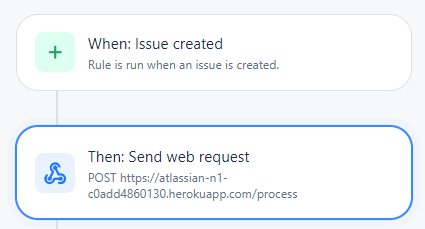
- Receiving Events: The script starts by listening for incoming events from Jira Automation. These events contain key information such as the summary, description, and reporter of the issue, along with the base URL of the Jira instance and the issue key.
- Fetching Relevant Articles: The script queries the knowledge base using the summary of the issue to fetch relevant articles. It parses these articles to extract the text content, which is then cleaned and formatted.
- Generating a Response: The script uses the OpenAI API to generate a response based on the fetched articles and the details of the issue. The response is crafted to be professional and helpful, resembling typical responses from a service desk agent.
- Posting the Comment: Finally, the script posts the generated response as a comment on the Jira issue, making it visible to the customer.
This solution automates the process of responding to common customer inquiries, potentially reducing the need for human intervention at the initial support level. It can handle a variety of issues by leveraging the information available in the knowledge
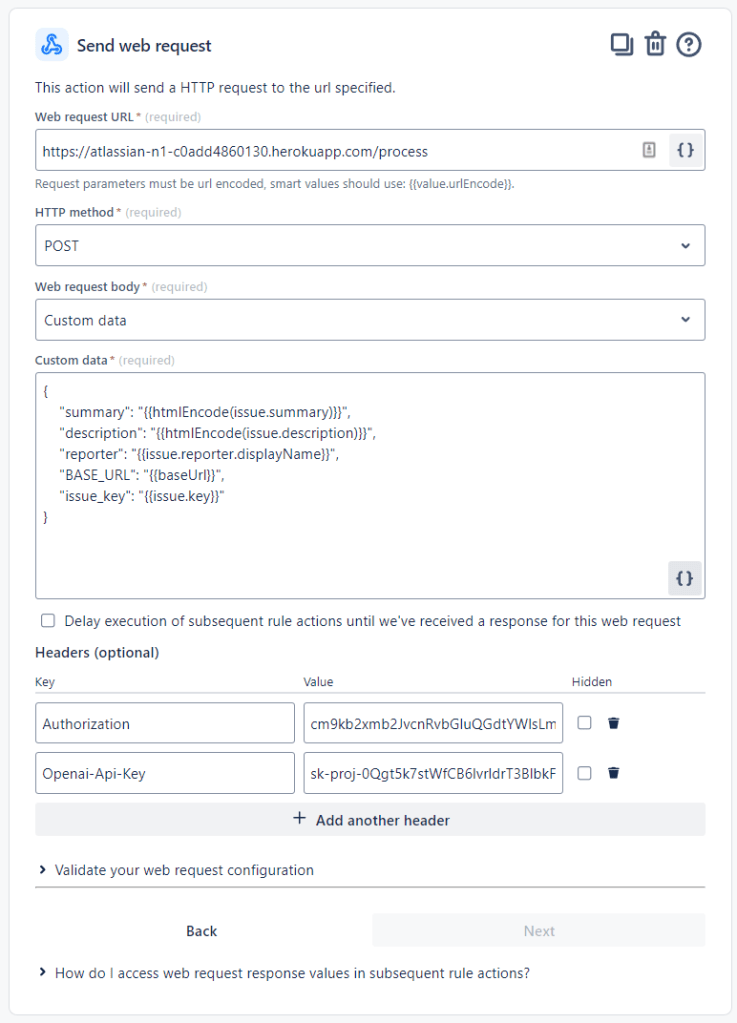
{
    "summary": "{{htmlEncode(issue.summary)}}",
    "description": "{{htmlEncode(issue.description)}}",
    "reporter": "{{issue.reporter.displayName}}",
    "BASE_URL": "{{baseUrl}}",
    "issue_key": "{{issue.key}}"
}
The Result
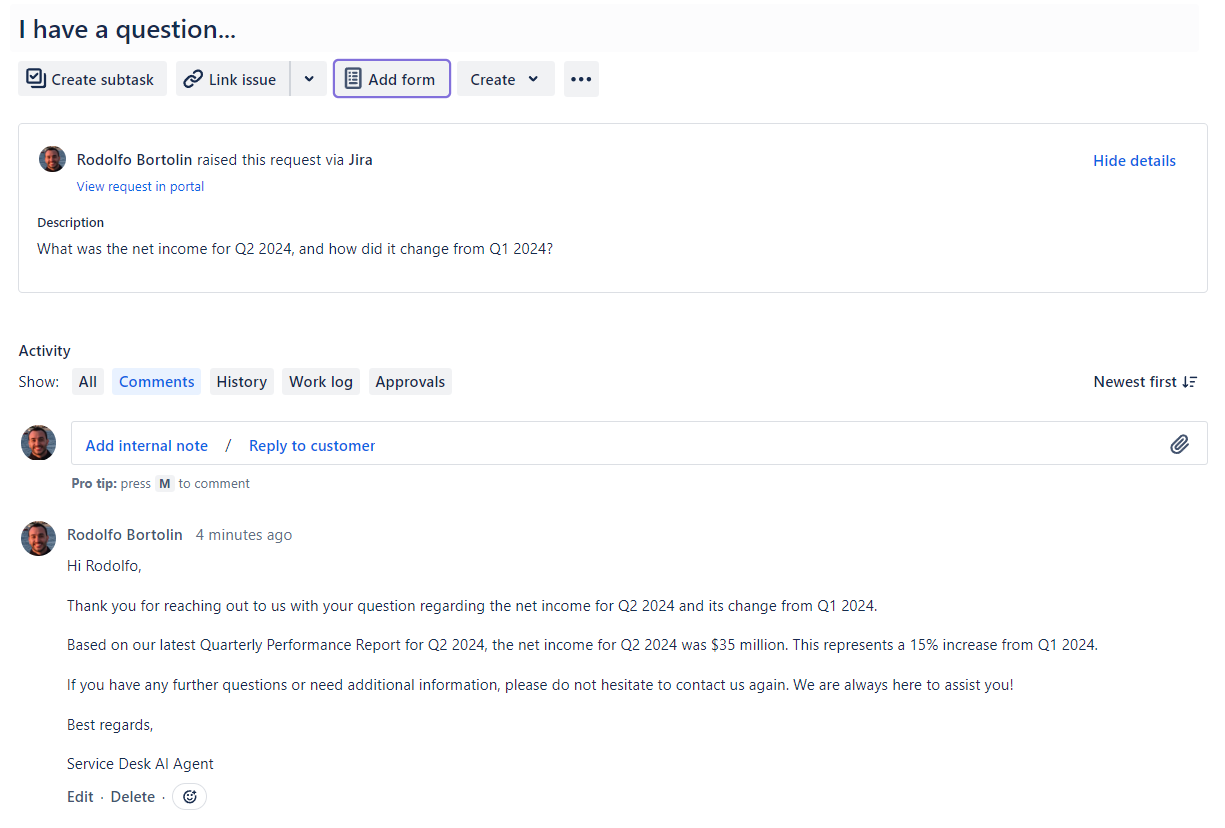
Here I created a question about how Net Income was in Q2 2024. Obviously not the best example, but it’s about something that doesn’t exist on the internet so it’s a fake Q2 2024 financial results report.
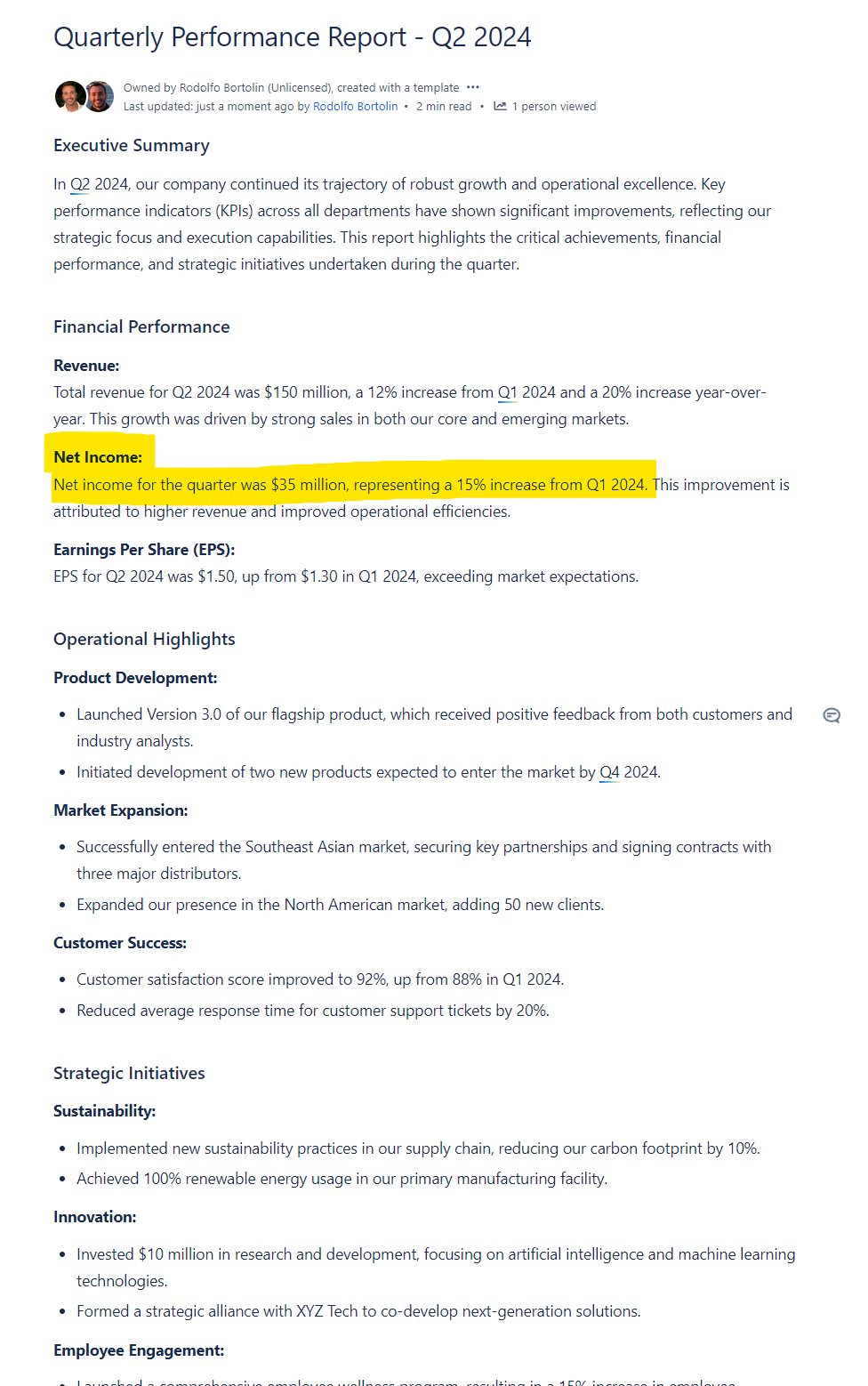
Here is the report stored in Confluence, and suggested in Jira Service Management as a possible article to respond to the customer.
Here are the related articles that were used to construct the prompt for ChatGPT within the JSM interface:

Note that the article “Quarterly Performance Report – Q2 2024” is not the first article suggested to the Agent, yet ChatGPT managed to identify that the information was in the third article and provide an accurate response to the customer.
Conclusion
By integrating Heroku, Jira Automation, and OpenAI, this solution offers a significant step towards automating the initial response phase of customer support (N1). This can help your team focus on more complex issues while providing quick and effective responses to common inquiries.
Is this the first step to replace N1 support? Perhaps not entirely, but it’s certainly a leap forward in enhancing efficiency and customer satisfaction.
 Atlassian Expert Tips