Introduction
Automation in Jira is typically driven by its robust API. However, there are scenarios where certain actions are not exposed via the API. In such cases, leveraging session cookies to interact with Jira endpoints can significantly extend scripts capabilities. This post will guide you through the process of using session cookies to make requests that are not available through the Jira API, with a detailed example script and instructions on how to obtain necessary information using Google Chrome.
Obtaining Session Cookies and Parameters
To perform actions that require session cookies, you need to capture the session cookies and request parameters from your browser. Here’s how you can do it using Google Chrome:
Step-by-Step Guide
- Open Developer Tools:
- Right-click on the webpage and select “Inspect” or press
Ctrl+Shift+Ito open Developer Tools.
- Right-click on the webpage and select “Inspect” or press
- Navigate to Network Tab:
- Go to the “Network” tab. This tab logs all network requests made by the browser.
- Perform the Action:
- Perform the action in Jira that you want to replicate (e.g., revoking access).

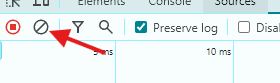
I suggest cleaning the logs right before you click in the action that you want to capture.

- Inspect the Request:
- Click on the request to open its details. Go to the “Headers” section.

- Copy the Cookie:
- Scroll down to find the “Request Headers” section. Copy the value of the “Cookie” header.

- Capture the Payload:
- Go to the “Payload” section to view the data sent with the request. Note down or copy this information.

- Construct Your Request:
- Use the captured cookie and payload in your script as shown in the example above.
Best Practices for Handling Session Cookies
- Never Share Cookies:
- Do not share your session cookies with others. Treat them like passwords.
- Clean Up After Use:
- Ensure that session cookies are deleted or invalidated after their intended use to minimize security risks.
The Script: Revoking User Access
Below is a Python script that demonstrates how to revoke a user’s access to a Jira product role using session cookies:
Script Explanation
- revoke_access Function:
- This function sends a POST request to revoke a user’s product role.
- It takes the API URL, headers (including session cookies), user ID, role, and resource as parameters.
- It logs success or failure based on the response status code.
- Main Function:
- Constructs the API URL using the organization ID and user ID.
- Sets up the headers with the required session cookie and content type.
- Calls
revoke_accessfunction with appropriate parameters to revoke user roles.
import requests
import logging

logging.basicConfig(level=logging.INFO, format='%(asctime)s - %(levelname)s - %(message)s')

def revoke_access(api_url, headers, user_id, role, resource):
    payload = [{"role": role, "resource": resource}]
    response = requests.post(api_url, headers=headers, json=payload)
    if response.status_code == 204:
        logging.info(f"Successfully revoked access for user: {user_id}")
    else:
        logging.error(f"Failed to revoke access for user: {user_id}, Status code: {response.status_code}, Response: {response.text}")

def main():
    api_url_template = "https://admin.atlassian.com/gateway/api/adminhub/um/org/{org_id}/users/{user_id}/revoke-product-role"
    org_id = "9d8406d3-b032-4ebb-a308-7001b55815d6"
    user_id = "621e7d5215521d00726a13d3"
    api_url = api_url_template.format(org_id=org_id, user_id=user_id)

    headers = {
        "Cookie": 'atl_xid.xc=%7B%22value%22%3A%22460023[...]',
        "Content-Type": "application/json"
    }

    role = "ari:cloud:jira-software::role/product/member"
    resource = "ari:cloud:jira-software::site/547e7644-02de-414c-aea9-eec310fd3ed8"

    revoke_access(api_url, headers, user_id, role, resource)

if __name__ == "__main__":
    main()
Conclusion
By leveraging session cookies, you can extend your Jira automation capabilities beyond the limits of the official API. This method opens up new possibilities for customizing and automating tasks within Jira. Always ensure that you handle session cookies securely and responsibly.
 Atlassian Expert Tips