When large companies acquire other businesses, one of the most challenging aspects is integrating different technology stacks and user management systems. In this post, I’ll share a solution for managing multiple Atlassian Cloud organizations using Azure SSO while standardizing email domains.
The Challenge
Consider this scenario: A large company has acquired two smaller businesses, each with their own Atlassian Cloud organization. The requirements are:
- Keep all three organizations separate for now
- Migrate all users to the parent company’s email domain (@parentcompany.com)
- Implement Azure SSO across all organizations
- Maintain the possibility of future consolidation into a single organization
The Solution Architecture
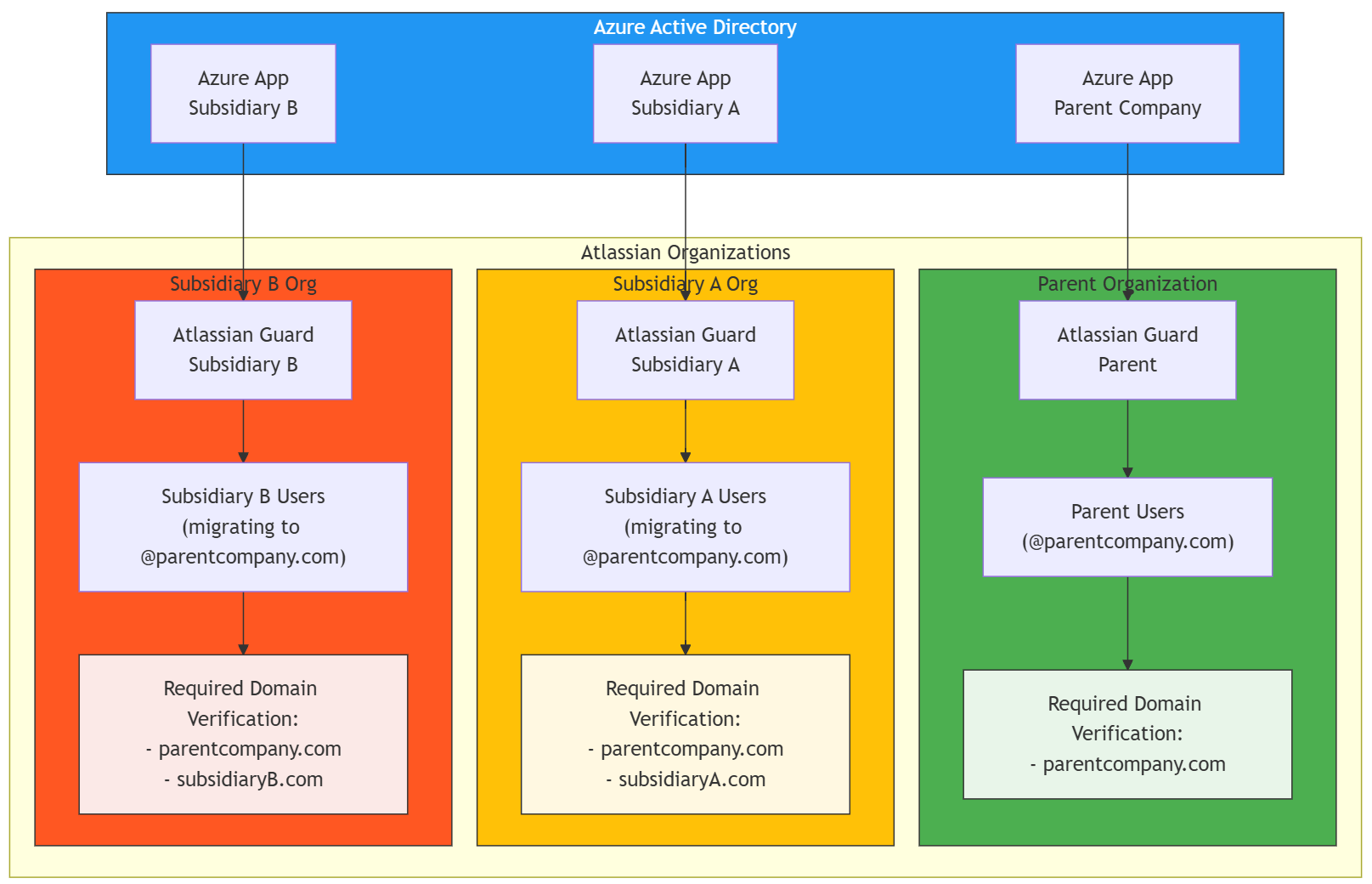
To address these requirements, the solution is using multiple Atlassian Guards with Azure AD applications. Here’s the breakdown:
1. Organization Structure
- Parent Organization
- Subsidiary A Organization
- Subsidiary B Organization
2. Identity Management
Each organization maintains its own Atlassian Guard instance for user management. This separation provides:
- Independent user management for each organization
- Granular control over access policies
- Flexibility for future changes
3. Azure AD Integration
The solution uses three separate Azure AD applications:
- One application for the parent organization
- One application for subsidiary A
- One application for subsidiary B
This setup allows for:
- Centralized user management in Azure AD
- Independent SSO configurations for each organization
- Clean separation of concerns
Implementation Steps
Step 1: Domain Verification
For each organization, verify the required domains:
Parent Organization:
- Verify @parentcompany.com
Subsidiary A:
- Verify @parentcompany.com
- Verify @subsidiaryA.com (existing domain)
Subsidiary B:
- Verify @parentcompany.com
- Verify @subsidiaryB.com (existing domain)
Step 2: Azure AD Configuration
- Create three separate Azure AD applications
- Configure each application with the appropriate SSO settings
- Set up user provisioning rules
- Configure authentication policies
Step 3: Atlassian Guard Setup For each organization:
- Set up Atlassian Guard
- Configure authentication policies
- Configure Claim Settings to “Manually claim”
- This setting is crucial as it allows you to:
- Upload CSV files for account claiming from verified domains
- Control user distribution across multiple business units
- Manage accounts when multiple organizations share the same email domain
- This setting is crucial as it allows you to:
- Link with corresponding Azure AD application
- Test SSO functionality
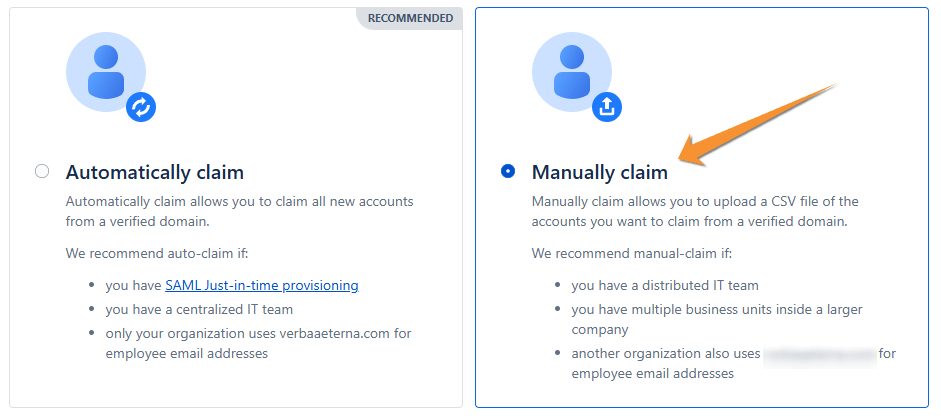
Note: Setting “Manually claim” in Atlassian Guard is essential in this scenario because:
- It prevents automatic user assignment to wrong organizations
- It provides greater control over the user migration process
- It allows for proper verification before claims are processed
- It supports the distributed IT team structure
- It’s particularly important when managing multiple organizations that will share the @parentcompany.com domain
Step 4: Email Migration
The email migration process requires careful planning and execution, especially when dealing with multiple organizations and varying numbers of users. Let’s break down the approach:
Detailed Migration Process:
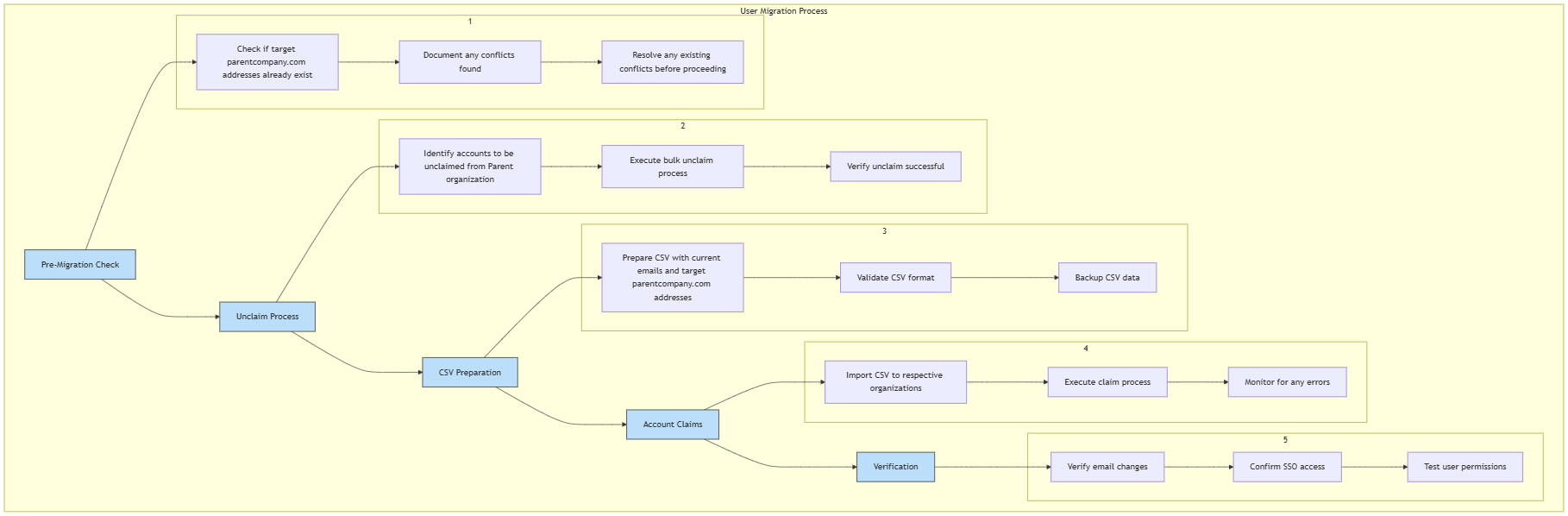
For Subsidiary B (25 users):
- Manual migration was the most practical approach due to the small number of users
- Each user’s email was changed individually through the Atlassian admin interface
- Process took approximately 1 hour to complete
- For instructions on manual email changes, see the Atlassian KB article
For Subsidiary A (500 users): We have two options for this larger-scale migration:
Option 1: Bulk CSV Migration
- Prepare a CSV file containing current and new email addresses
- Submit the CSV file to Atlassian Support for processing
- Allows for all changes to be made in a single batch
- Reduces manual effort and potential for errors
Option 2: API Integration
- Use the Email Management API endpoint
- Create a script to automate the process
- Provides more control over the migration timing
- Allows for custom error handling and validation
- Better for phased migrations where needed
Best Practices for Large-Scale Migration:
- Plan communication with users well in advance
- Execute migrations during off-peak hours
- Implement a verification process post-migration
- Have a rollback plan ready if needed
Benefits of This Approach
- Separation of Concerns
- Each organization maintains independence
- Changes in one organization don’t affect others
- Easier troubleshooting and management
- Scalability
- Easy to add more organizations if needed
- Supports future acquisitions
- Flexible for different organization sizes
- Future-Proofing
- Prepared for eventual consolidation
- Easy to maintain during transition periods
- Supports gradual migration approaches
- Security
- Granular control over access policies
- Independent security configurations
- Separate audit trails
Future Considerations
While this solution keeps organizations separate, it’s designed with future consolidation in mind. When the time comes to merge into a single organization, the groundwork is already laid:
- Users are already on the parent company domain
- Azure AD integration is established
- User management processes are standardized
This makes the eventual consolidation process much smoother, as the major identity management pieces are already in place.
Conclusion
While managing multiple Atlassian organizations with separate Guards and Azure applications might seem complex, it provides the flexibility and control needed during major organizational changes. This approach allows for independent operation while maintaining the option for future consolidation.
 Atlassian Expert Tips