I’m excited to share this solution that leverages Automation for Jira and OpenAI (ChatGPT-4) to change how we handle customer interactions and ticket escalations.
Objective: The goal of this solution is to utilize AI to automatically escalate support tickets before the customer feels the need to escalate them. This is achieved by analyzing the sentiment of the customer and the nature of the interactions within the ticket.
Summary
This automation rule is designed to:
- Monitor comments on service desk tickets.
- Analyze the sentiment of customer interactions using OpenAI’s sentiment analysis.
- Automatically escalate tickets if the sentiment is negative and notify relevant stakeholders.
- Proactively manage tickets by identifying risks of escalation and updating issue fields accordingly.
Automation Workflow
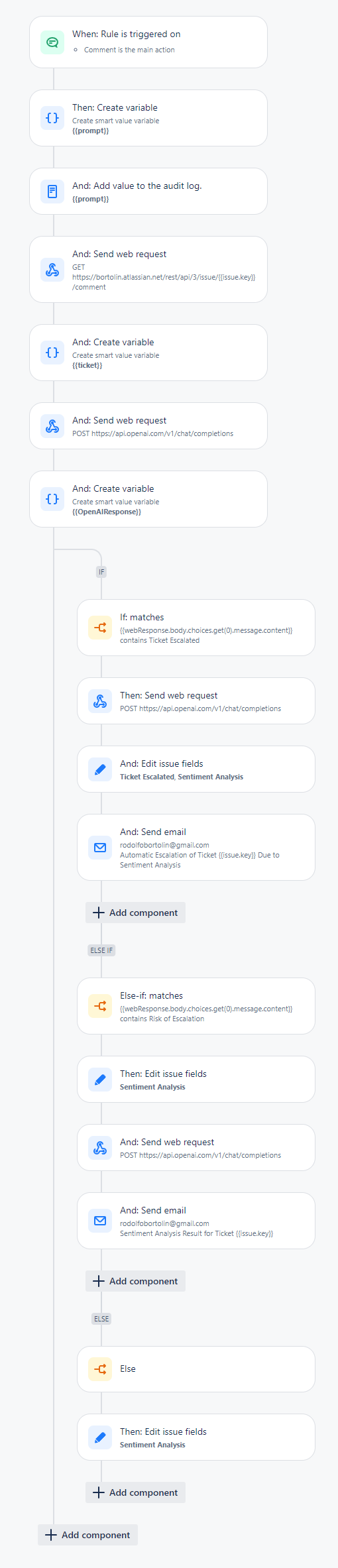
Here is a visual representation of the automation rule configured in Jira Service Desk:
Explanation of the Automation Rule
- Trigger: When Rule is Triggered on Comment
- This rule is activated whenever a comment is added to a service desk ticket.
- Then: Create Variable
- A variable
{{prompt}}is created. This variable is used to store the data that will be sent to OpenAI for sentiment analysis.
- A variable
- And: Add Value to the Audit Log
- Logs the value of
{{prompt}}to the audit log for record-keeping and debugging purposes.
- Logs the value of
- And: Send Web Request (GET)
- Sends a GET request to fetch the latest comments on the ticket from Jira’s REST API. The endpoint is
https://bortolin.atlassian.net/rest/api/3/issue/{{issue.key}}/comment.
- Sends a GET request to fetch the latest comments on the ticket from Jira’s REST API. The endpoint is
- And: Create Variable
- A variable
{{ticket}}is created to store the ticket details.
- A variable
- And: Send Web Request (POST)
- Sends a POST request to OpenAI’s API (
https://api.openai.com/v1/chat/completions) with the collected comments and ticket details for sentiment analysis.
- Sends a POST request to OpenAI’s API (
- And: Create Variable
- A variable
{{OpenAIResponse}}is created to store the response from OpenAI.
- A variable
- IF Condition: Check for Escalation
- If: matches
- Checks if the response from OpenAI contains the text “Ticket Escalated.” If it does, it indicates that the sentiment analysis determined the ticket needs escalation.
- Then: Send Web Request (POST)
- Sends another POST request to OpenAI to get the reason why it thinks that ticket needed immediate escalation.
- And: Edit Issue Fields
- Updates the issue fields in Jira to reflect that the ticket has been escalated based on sentiment analysis.
- And: Send Email
- Sends an email to notify the relevant stakeholders (e.g., service desk manager) about the automatic escalation due to negative sentiment analysis. The email includes details of the ticket and the sentiment score.
- If: matches
- Else-If Condition: Check for Risk of Escalation
- Else-if: matches
- Checks if the response from OpenAI contains the text “Risk of Escalation.” If it does, it indicates that the sentiment analysis identified a potential risk of the ticket needing escalation soon.
- Then: Edit Issue Fields
- Updates the issue fields in Jira to reflect the current sentiment analysis, indicating a risk of escalation.
- And: Send Web Request (POST)
- Sends another POST request to OpenAI to get the reason why it thinks it’s a risk.
- And: Send Email
- Sends an email to notify stakeholders about the sentiment analysis results indicating a risk of escalation. This helps in proactively managing the ticket before it gets escalated.
- Else-if: matches
- Else Condition:
- Else
- If the sentiment analysis does not indicate escalation or a risk of escalation, the rule simply updates the sentiment analysis fields in Jira without taking further action.
- Then: Edit Issue Fields
- Updates the issue fields to reflect the sentiment analysis results, which might be positive or neutral.
- Else
The Prompt {{prompt}}
You are an assistant assigned to evaluate the interaction within the service desk ticket provided to you.
\n\n
I will provide you with all the interactions between the service desk agent and the customer who opened the ticket, as well as the ticket’s title and description.
\n\n
With this information, you will be responsible for predicting and analyzing the customer’s sentiment regarding the agent’s service, functioning as an automation to escalate the ticket if necessary.
\n\n
Note that you will be triggered with each interaction, so there may be more interactions to come in the future.
\n\n
The main criteria I need you to evaluate are, but are not limited to:
\n\n
Many back-and-forth comments between the customer and the agent without appearing to be close to a resolution.
If you observe that the customer’s sentiment is one of losing patience, negative sentiment, or that the service is too slow given the urgency that should be addressed for the ticket in question.
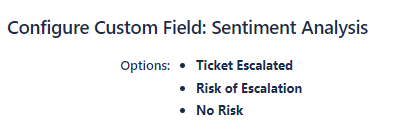
The possible values of your analysis are: Ticket Escalated, Risk of Escalation, No Risk.
\n\n
Chose “Ticket Escalated” in case you are really confident that it’s necessary to escalate the ticket.
\n\n
DO NOT make up new criteria or options. or change the format of the response
\n\n
Based on your evaluation, I need you to return only this as a response, as an example:
\n\n
Sentiment: Risk of Escalation
Ticket details {{ticket}}
Reporter: {{issue.fields.reporter.displayName}} \n Assignee: {{issue.fields.assignee.displayName}} \n Summary/Title of the ticket: {{issue.fields.summary}} \n Description: {{issue.fields.description}} \n The resolution of the ticket was set to : {{issue.fields.resolution.name}} \n Interactions: \n {{#webResponse.body.comments}} {{created}} — {{author.displayName}}: {{#body.content}}{{content.text}} \n{{/}}, {{/}}
Email Template
Subject: Automatic Escalation of Ticket {{issue.key}} Due to Sentiment Analysis
I wanted to inform you that your service desk ticket {{issue.key}} titled “{{issue.summary}}” has been automatically escalated based on the results of our sentiment analysis.
Ticket Summary: {{issue.summary}}
Ticket Description: {{issue.description}}
Agent Handling Ticket: {{assignee.displayName}}
Latest Interaction Timestamp: {{issue.comments.last.created.shortDateTime}}
Customer Sentiment: {{OpenAIResponse}}
Reason: {{webResponse.body.choices.get(0).message.content}}Our system detected that the sentiment of the recent interactions indicates a growing concern and urgency. As a result, the following actions have been taken:
Detailed Interactions:
{{#issue.comments}}
{{created.shortDateTime}} by {{author.displayName}}:
{{body}}
{{/}}
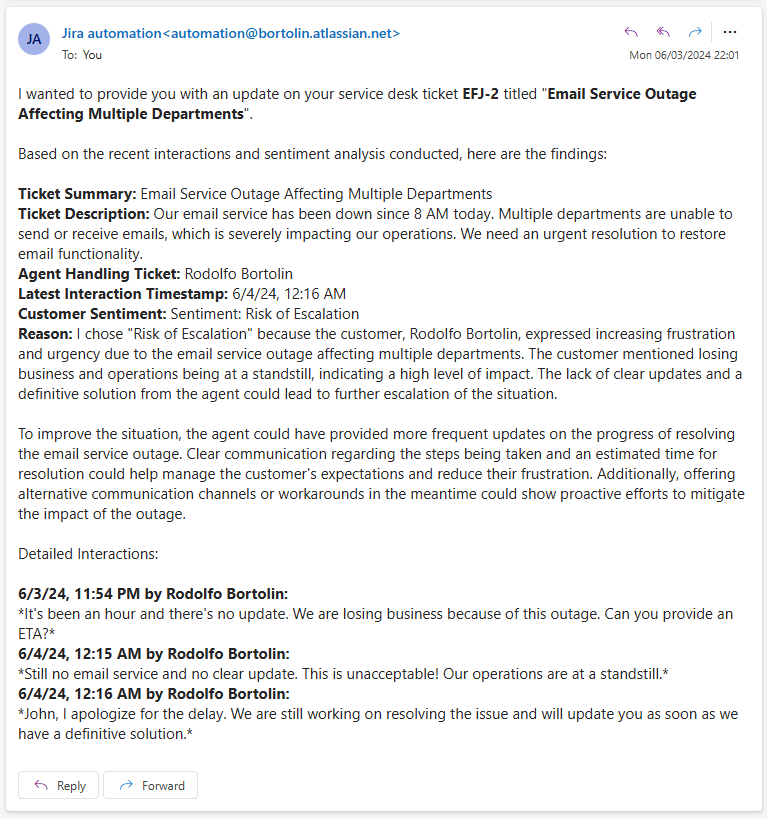
Email Notification Template
Example Email for Automatic Escalation:
Custom Fields

By implementing an AI-driven solution for auto-escalating tickets, the support process becomes more efficient and customer-centric. This proactive approach helps in resolving issues faster, thereby enhancing the overall customer experience. Regular monitoring and analysis will ensure the solution remains effective and continuously improves over time.
 Atlassian Expert Tips
Thanks for sharing this article. I have 2 questions:
LikeLike
Hello Adolfo! Thank you for your comment! Regarding your points:
1) This is just an idea for now. It has not been implemented in a real scenario yet. I imagine many tests would be necessary and some changes to the prompt. See this as a starting point.
2) I think a manual mechanism in the workflow is still necessary. The idea of this solution is to escalate the ticket even before the user needs to take this action, so actions can be taken before the client does, generating more satisfaction in the service.
LikeLike